# Functions
Currently, the SDK offers a single [function ](#checkout.init)that serves as the entry point for the merchant's application. It also includes [callbacks](#callbacks) that must be managed by the parent app, which are detailed in the following [section](#callbacks).
## [**Checkout.init**](https://docs.ottu.com/developer/checkout-sdk/web#checkout.init)
The function initiates the checkout process and configures the required settings for the Checkout SDK. It should be invoked once by the parent app to start the checkout sequence, called with set of configuration fields that encapsulate all essential options for the process.
When you call `Checkout.init`, the SDK manages the setup of key components for the checkout, like generating a form for customers to input their payment information, and facilitating the communication with Ottu's servers to process the payment.
This function returns a `Fragment` object, which is a native Android UI component that can be integrated into any part of an `Activity` instance (also native to Android).
## [Properties](#properties)
#### [**merchantId**](#merchantid-string-required) *`string`* *`required`*
The `merchant_id` identifies your Ottu merchant domain. It should be the root domain of your Ottu account, excluding the "https\://" or "http\://" prefix.
For instance, if your Ottu URL is , then your `merchant_id` would be example.ottu.com. This attribute is utilized to determine which Ottu merchant account to associate with the checkout process.
#### [**apiKey**](#apikey-string-required) *`string`* *`required`*
The `apiKey` is your Ottu [API public key](https://docs.ottu.com/authentication#public-key), which is essential for authenticating communications with Ottu's servers during the checkout process.
{% hint style="warning" %}
Make sure to use the public key and avoid using the private key. The [API private key](https://docs.ottu.com/authentication#private-key-api-key) must be kept confidential at all times and should never be shared with any clients.
{% endhint %}
#### [**sessionId**](#sessionid-string-required) *`string`* *`required`*
The `session_id` serves as the unique identifier for the payment transaction linked to the checkout process.
This identifier is automatically generated at the creation of the payment transaction. For additional details on how to utilize the `session_id` parameter in the [Checkout AP](https://docs.ottu.com/developer/checkout-api)I, refer to the [session\_id](https://docs.ottu.com/developer/checkout-sdk/android/broken-reference) section.
#### [**formsOfPayment**](#formsofpayment-string-required) *`array`* *`optional`*
The `formsOfPayment` parameter allows customization of the payment methods displayed in the [checkout process](https://docs.ottu.com/developer/checkout-sdk/..#ottu-checkout-sdk-flow). By default, all forms of payment are enabled.
**Available Options for** `formsOfPayment`
* **`cardOnsite`**: A direct payment method (onsite checkout) where cardholder data (CHD) is entered directly in the SDK. If 3DS authentication is required, a payment provider is involved.
* `tokenPay`: Uses [tokenization](https://docs.ottu.com/developer/tokenization) to securely store and process customers' payment information.
* `redirect`: Redirects customers to an external [payment gateway](https://docs.ottu.com/user-guide/payment-gateway#payment-gateway-features-summary) or a third-party payment processor to complete the transaction.
* `stcPay`: Requires customers to enter their mobile number and authenticate with an OTP sent to their device to complete the payment.
* `flexMethods`: Allows payments to be split into multiple installments. These methods, also known as BNPL (Buy Now, Pay Later), support providers such as Tabby and Tamara.
#### [**setupPreload**](#setuppreload-object-optional) *`object`* *`optional`*
The `TransactionDetails` class object stores transaction details.
If this object is provided, the SDK will not need to retrieve transaction details from the backend, thereby reducing processing time and improving efficiency.
#### [**theme**](#theme-object-optional) *`object`* *`optional`*
The `Theme` class object is used for UI customization, allowing modifications to background colors, text colors, and fonts for various components.
All fields in the `Theme` class are optional. If a theme is not specified, the default UI settings will be applied. For more details, refer to the [Customization Theme](#customization-theme) section.
#### [**displaySettings**](#displaysettings-object-optional) *`object`* *`optional`*
The `PaymentOptionsDisplaySettings` struct is used to configure how payment options are displayed.
More details can be found in the [Payment Options Display Mode](#payment-options-display-mode) section.
#### [**successCallback, errorCallback and successCallback**](#successcallback-errorcallback-and-successcallback-uint-required) *`Uint`* *`required`*
Callback functions are used to retrieve the payment status and must be provided directly to the Checkout initialization function. For more details, refer to the [Callbacks](#callbacks) section.
## [Payment Options Display Mode](#payment-options-display-mode)
The display of payment options can be adjusted using the SDK with the following settings:
* `mode` (`BottomSheet` or List)
* `visibleItemsCount` (default is 5)
* `defaultSelectedPgCode` (default is none)
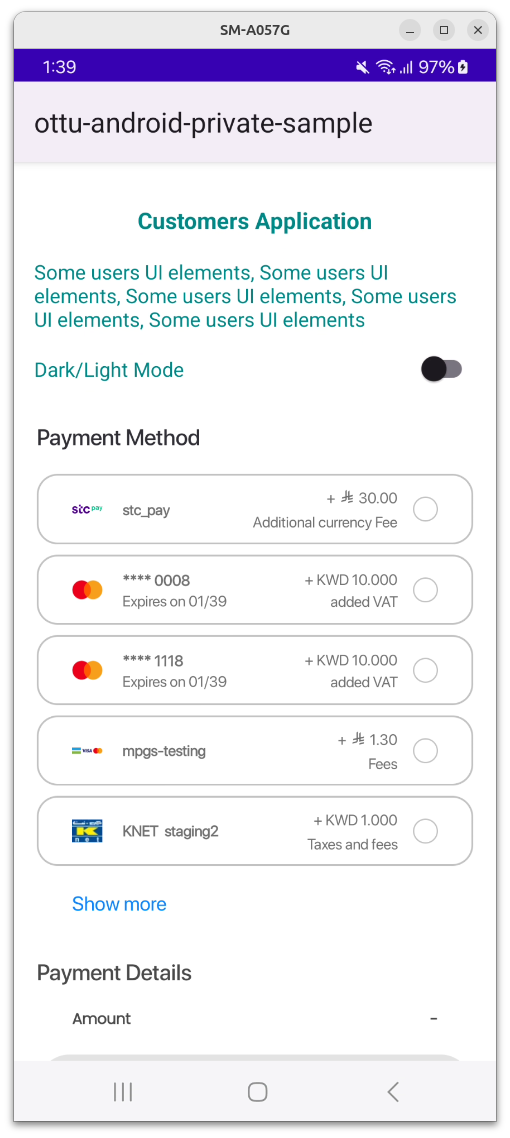
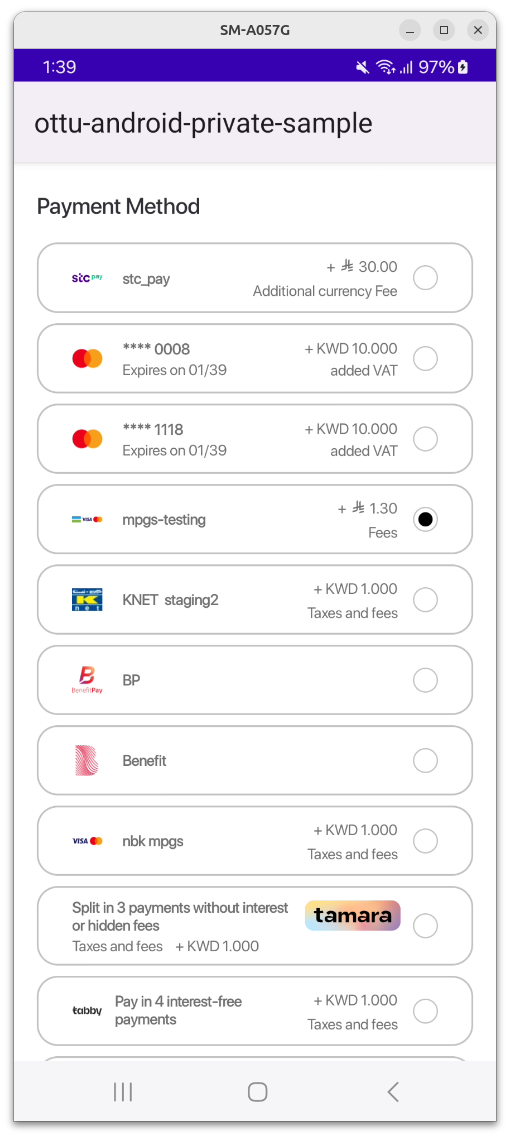
By default, **BottomSheet mode** is used, as was implemented in previous releases. **List mode** is a new option that allows the list of payment methods to be displayed above the **Payment Details** section and the **Pay** button.
**A view with a selected item:**
**A view with an expanded list:**
* `visibleItemsCount` is an unsigned integer that sets the number of items to be displayed at once. It works only in List mode. If the number of available payment options is fewer than this value, the list height is automatically adjusted to the minimum required.
{% hint style="info" %}
If 0 is passed, an exception is thrown by the SDK, which must be handled by the parent app.
{% endhint %}
* `defaultSelectedPgCode` is a PG code that will be automatically selected. The SDK searches for the payment option with the matching PG code and selects it if found. If no match is found, no selection is made.
All these parameters are optional and are constructed using the following function:
{% code overflow="wrap" %}
```swift
private fun getPaymentOptionSettings(): Checkout.PaymentOptionsDisplaySettings {
val visibleItemsCount = 5 // set needed value here
val selectedPgCode = "knet" // set needed value here
val mode = Checkout.PaymentOptionsDisplaySettings.PaymentOptionsDisplayMode.List(visibleItemsCount)
return Checkout.PaymentOptionsDisplaySettings(mode, selectedPgCode)
}
```
{% endcode %}
These parameters are passed to the `Checkout.init` builder class via the following object:
```swift
.displaySettings(displaySettings)
```
To view the full function call, please refer to the [Ottu SDK - Android | Example](#example) chapter in the documentation.