M-Wallet
M-Wallet (merchant wallet) lets you refund customer payments to a stored balance keyed by merchant, customer, and currency, then let the customer spend that credit at any future Ottu checkout in the same currency. No PII is stored on the wallet service.
Authentication for merchant-facing endpoints follows the standard Ottu API key flow — the same key you use for the Checkout API. Service-to-service auth between Ottu Connect and the wallet service uses OAuth 2.0 internally and is invisible to merchants.
Every API call in this guide targets https://sandbox.ottu.net. Swap in your own merchant domain when you integrate.
Ottu offers SDKs and tools to speed up your integration. See Getting Started for all available options.
When to Use
- Refunding without returning funds to the original card or gateway — loyalty, goodwill, or voucher use cases.
- Letting customers carry over balance between sessions.
- Reducing payment-gateway fees by spending wallet credit before charging a card.
- Multi-currency merchants — each currency maintains its own wallet account.
Guide
Workflow
Wallet credit is created when a merchant refunds with destination: "wallet" — see Refund to Wallet. Once a customer has positive balance in the session currency, the developer journey to spend it is:
- Filter the payment methods — call the Payment Methods API with
payment_services: ["wallet"]to get the wallet-capablepg_codes. - Create a Checkout session — call the Checkout API with those
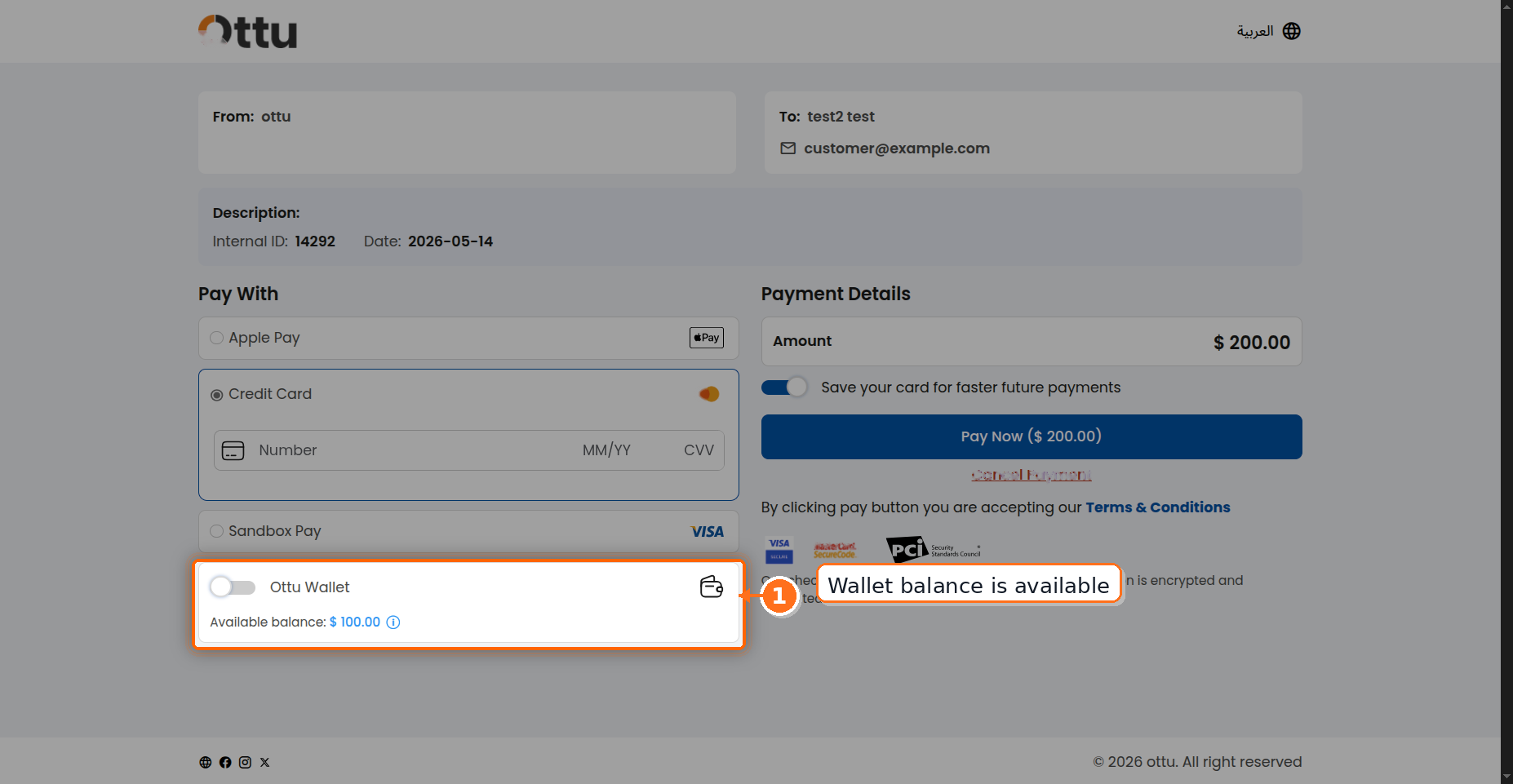
pg_codesand thecustomer_id. Thecustomer_idis what binds the session to that customer's wallet account. - Initialize the Checkout SDK — the SDK fetches the wallet balance from Ottu Connect and renders "Wallet (X.XXX CCC)" alongside the other payment methods.
- Customer applies wallet on submit — Ottu Connect reserves the required amount (or the full balance, whichever is lower). Any shortfall is charged through the selected gateway.
- Commit or release — on success the reservation commits to a debit entry; on abandon, cancel, or failure it auto-releases after about four hours.
Live Demo
Try the wallet flow below. The demo discovers a wallet-capable gateway, seeds a fresh customer's wallet through the docs backend, creates a Checkout session, and mounts the SDK so you can pay with wallet. Screenshots of the merchant-side flow are on the business wallet pages.
Try M-Wallet at Checkout
Loading…
Step-by-Step
1. List the wallet-capable payment gateways
Call the Payment Methods API (POST /b/pbl/v2/payment-methods/) with payment_services: ["wallet"] to filter the gateway list to those that support wallet payments. Use these pg_codes when creating the Checkout session.
curl --location 'https://sandbox.ottu.net/b/pbl/v2/payment-methods/' \
--header 'Authorization: Api-Key <YOUR_API_KEY>' \
--header 'Content-Type: application/json' \
--data '{
  "plugin": "e_commerce",
  "currencies": ["KWD"],
  "type": "sandbox",
  "payment_services": ["wallet"],
  "tags": ["demo"]
}'
{
  "customer_payment_methods": [],
  "payment_methods": [
    {
      "code": "ottu-sandbox",
      "name": "Ottu Sandbox",
      "is_sandbox": true,
      "default_currency": "KWD",
      "accepted_currencies": ["KWD", "SAR", "AED", "USD", "BHD"],
      "operation": "purchase",
      "operations": ["refund"],
      "is_tokenizable": true,
      "auto_debit_enabled": true,
      "payment_services": ["wallet"],
      "tags": ["e_commerce", "demo"]
    }
  ]
}
customer_id filterYou don't need customer_id to discover wallet-capable gateways generically. If you do pass customer_id and that customer has a wallet enabled in the session currency, the wallet entry will be returned alongside the standard payment methods. To narrow the gateway list to wallet-capable PGs for later refunds, use payment_services: ["wallet"] as shown above.
For the full request/response reference, headers, error codes, and supported filters, see the Payment Methods API page.
2. Create a Checkout session with the wallet-capable PGs
Call the Checkout API with the pg_codes returned in step 1, plus the customer_id to enable the customer's wallet on this session. The response includes a session_id that you pass to the SDK in the next step.
curl --location 'https://sandbox.ottu.net/b/checkout/v1/pymt-txn/' \
--header 'Authorization: Api-Key <YOUR_API_KEY>' \
--header 'Content-Type: application/json' \
--data '{
  "type": "e_commerce",
  "pg_codes": ["ottu-sandbox"],
  "amount": "12.500",
  "currency_code": "KWD",
  "customer_id": "cust_abc123",
  "customer_email": "[email protected]",
  "customer_phone": "+96550000000"
}'
{
"session_id": "sess_9f8e7d6c5b4a",
"checkout_url": "https://sandbox.ottu.net/checkout/sess_9f8e7d6c5b4a",
"checkout_short_url": "https://sandbox.ottu.net/c/sess_9f8e7d6c5b4a",
"expiration_time": "00:30:00"
}
The session_id returned here is what step 3 passes into Checkout.init. The customer_id is what links the session to that customer's wallet account — wallet appears in the SDK only when (a) the session has a customer_id and (b) the wallet account for (merchant, customer_id, currency) has positive balance.
When you list several payment gateways in pg_codes, Ottu checks the wallets behind them. If two or more of the selected gateways each carry a wallet from the same wallet provider that can be used for the transaction's currency, the checkout creation request is rejected with HTTP 400 — the checkout page could not unambiguously show which wallet balance to apply. Choose your pg_codes so that at most one wallet per provider is available for the transaction.
For example, the request below lists two gateways — gateway-a and gateway-b — that each have a wallet from the same provider available in KWD:
curl --location 'https://sandbox.ottu.net/b/checkout/v1/pymt-txn/' \
--header 'Authorization: Api-Key <YOUR_API_KEY>' \
--header 'Content-Type: application/json' \
--data '{
  "type": "payment_request",
  "amount": "10.000",
  "currency_code": "KWD",
  "pg_codes": ["gateway-a", "gateway-b"]
}'
Because both gateways expose a same-provider wallet for KWD, the request fails:
{
  "pg_codes": [
    "Multiple wallets of the same provider are available for this currency across the selected payment gateways. Only one wallet per provider may be available for a transaction."
  ]
}
3. Render the Checkout SDK with the session
Add a mount point to your page — the SDK looks for an element matching selector:
<div id="checkout"></div>
Then initialize the SDK with the session_id returned by step 2:
Checkout.init({
selector: "checkout",
merchant_id: "sandbox.ottu.net", // use your merchant id
apiKey: "YOUR_API_PUBLIC_KEY",
session_id: "sess_9f8e7d6c5b4a",
formsOfPayment: ["wallet", "ottu-sandbox"], // or omit to show all
});
4. Customer applies wallet credit at checkout
The SDK reserves the required amount (or the full balance, whichever is lower). If the session amount exceeds the wallet balance, the customer is prompted to pick a second method for the remainder. On submit, all reservations confirm together. On success the wallet entry commits; on cancel, error, or four-hour timeout it auto-releases.
Wallet appears as a method
Full coverage: balance ≥ amount
Partial coverage: balance < amount
Authorize-only: wallet hidden
Try it
customer_id on the Checkout API session.5. (Optional) Read wallet state from your backend
Reading wallet state from your backend is optional — the same balance, ledger, and operation views are available in the Ottu dashboard. Use the read APIs only if you want to surface wallet operations to your end customers in your own UI. See the API Reference section below.
Use Cases
Partial payments (wallet plus another method)
Three balance-versus-amount cases:
| Wallet balance vs amount | Behavior |
|---|---|
| Balance ≥ amount | Only amount is deducted. Surplus stays in the wallet. |
| Balance == amount | Wallet fully covers; balance becomes 0. |
| Balance < amount | Full balance is consumed; customer pays the difference with another method. |
Customers cannot choose how much wallet credit to apply — Ottu computes it automatically.
Reservation lifecycle
- Reserved when the customer submits payment.
- Committed on payment success.
- Released automatically about four hours after an abandoned, cancelled, or failed payment. No human intervention.
Wallet hidden for authorize-only sessions
When the session is configured for authorization-only (no immediate capture), wallet is not offered as a payment method. Wallet supports immediate-capture flows only.
Refunding to wallet
See Refund to Wallet on the Operations page for the full API and behavior. The refund endpoint accepts destination: "wallet" to credit the wallet instead of reversing through the gateway.
A transaction settled with wallet credit cannot be refunded back to the wallet — or to any other destination. Once a customer spends their balance at checkout, that leg of the payment is final.
A KWD wallet cannot be used to pay a SAR order, and vice versa. Each currency maintains a separate wallet account.
Wallet Transactions
When a payment is settled with wallet credit, the payment details — returned by the Checkout API retrieve call, the PSQ inquiry, and payment webhooks — include a customer_wallet_transactions array. Each element is one wallet leg that contributed to the payment, so you can attribute every leg without a separate call to the wallet read APIs.
The key is omitted entirely when no wallet was involved. A single-wallet payment emits a one-element list; multi-wallet stacking (M-Wallet credit plus a loyalty wallet, for example) emits one element per provider.
| Field | Type | Description |
|---|---|---|
provider_code | string | Stable identifier of the wallet provider that handled this leg — e.g. wallet_ottu. Empty for legacy native payments where the provider wasn't recorded. |
amount | string | Amount charged from this wallet leg. |
currency | string | ISO 4217 currency code of the leg. |
operation_id | string | Wallet service operation ID — the join key to the wallet ledger. |
wallet_response | object | Full raw response from the wallet service for this leg. |
created_at | string (date-time) | When the wallet transaction was created. |
modified_at | string (date-time) | When the wallet transaction was last modified. |
"customer_wallet_transactions": [
  {
    "provider_code": "wallet_ottu",
    "amount": "5.000",
    "currency": "KWD",
    "operation_id": "op_7c2f9a1e4b",
    "wallet_response": {
      "amount": "5.000",
      "currency": "KWD",
      "status": "completed",
      "operation_id": "op_7c2f9a1e4b"
    },
    "created_at": "2026-05-20T09:14:33Z",
    "modified_at": "2026-05-20T09:14:35Z"
  }
]
Use these fields to keep your own system in sync:
- Reconciliation — sum
amountacross the array to know how much of the payment wallet credit covered. The remainder (paid_amountminus the wallet total) is what the payment gateway settled, so you can split a single payment across the two funding sources in your books. - Audit trail — store
operation_idagainst your order. Pass it to Get Operation by ID to pull every ledger entry the operation produced for a full audit record. - System updates — use
provider_codeto attribute the credit to the correct wallet program, andcreated_at/modified_atto timestamp the movement in your own ledger.
Stacked-wallet setups (e.g., M-Wallet + Qitaf) emit one record per provider in the same payload; single-wallet payments emit a one-element list — so you can reconcile multi-wallet payments without polling the wallet read APIs.
API Reference
Three read APIs let you query wallet state from your backend. All three accept the standard Ottu API key authentication and are POST endpoints — the request body carries the customer_id (and, where required, the currency) that scopes the query.
- List Wallet Accounts
- List Ledger Entries
- Get Operation by ID
Best Practices
- Discover per session. Always call Payment Methods API per session — don't assume balance from a prior call.
- Display balance fresh. Call List Accounts on page load if you show balance in your own UI. Cache only briefly; balance changes on every payment.
- Append-only ledger. Never derive balance client-side from history — rely on the Accounts endpoint for authoritative balance.
- Match the currency. For multi-currency merchants, present the wallet matching the session currency only.
FAQ
What's Next?
- Refund to M-Wallet (Operations) — the refund API change that creates wallet credits.
- Checkout SDK — M-Wallet section — how wallet appears in the SDK.
- Payment Methods API — discovering available payment methods.
- M-Wallet for merchants — business-side documentation.