# Native Payment API
Use the Native Payment API when you want full control of the client experience (web or mobile) and prefer not to use the [Checkout SDK](https://docs.ottu.com/developer/checkout-sdk). Your client or backend collects a payment payload and sends it to Ottu to process the payment for a given [session\_id](https://docs.ottu.com/checkout-api#session_id-string-mandatory).
A payment payload can be:
* Wallet payment data (e.g., Apple Pay paymentData, Google Pay paymentMethodData) — typically encrypted by the wallet.
* Gateway token / network token (card-on-file or one-click use cases) — not necessarily encrypted.
Ottu processes the payload with the configured gateway and returns a normalized callback result.
#### [**When to Use**](#when-to-use)
* Apple Pay or Google Pay buttons are rendered and managed by you.
* Existing tokenization has already been implemented and needs to be used to charge with a gateway token.
* Granular, SDK-less control of the UX is required, while Ottu’s orchestration and gateway integrations are still leveraged.
## [Quick Start](#quick-start)
Send a post request to the payment service endpoint with payment [session\_id](https://docs.ottu.com/checkout-api#session_id-string-mandatory), then the payment service collected `token` to perform the payment process.
#### Quick Apple Pay Example (cURL)
```json
curl -X POST "https://sandbox.ottu.net/b/pbl/v2/payment/apple-pay/" \
-H "Authorization: Api-Key GYj5Na8H.29g9hqNjm11nORQMa2WiZwIBQQ49MdAL" \
-H "Content-Type: application/json" \
-d '{
"payload": {
"pg_code": "apple-pay",
"session_id": "str",
"payload": {
"paymentData": {
...
}
} // the apple payment token without modifications
}
}'
```
Ottu securely processes the Apple Pay request and returns a unified success response once the payment is completed.
```json
{
"result": "success",
"message": "successful payment",
"pg_response": {}
}
```
Use the response values to reconcile the payment in your backend and update your order state.
Continue with the sections below to learn more about response fields, error handling, and webhook integration.
## [Authentication](#authentication)
**Supported Methods**
* [Private API Key](https://docs.ottu.com/authentication#private-key-api-key) (Server-Only)
* [Public API Key](https://docs.ottu.com/authentication#public-key) (Client-Safe)
* [Basic Authentication](https://docs.ottu.com/authentication#basic-authentication) (Server-Only)
For detailed information on authentication procedures, please refer to the [Authentication ](#authentication)section.
{% hint style="danger" %}
The Private API Key must **never** be exposed in any client-side application.
{% endhint %}
## [Integration Flows](#integration-flows)
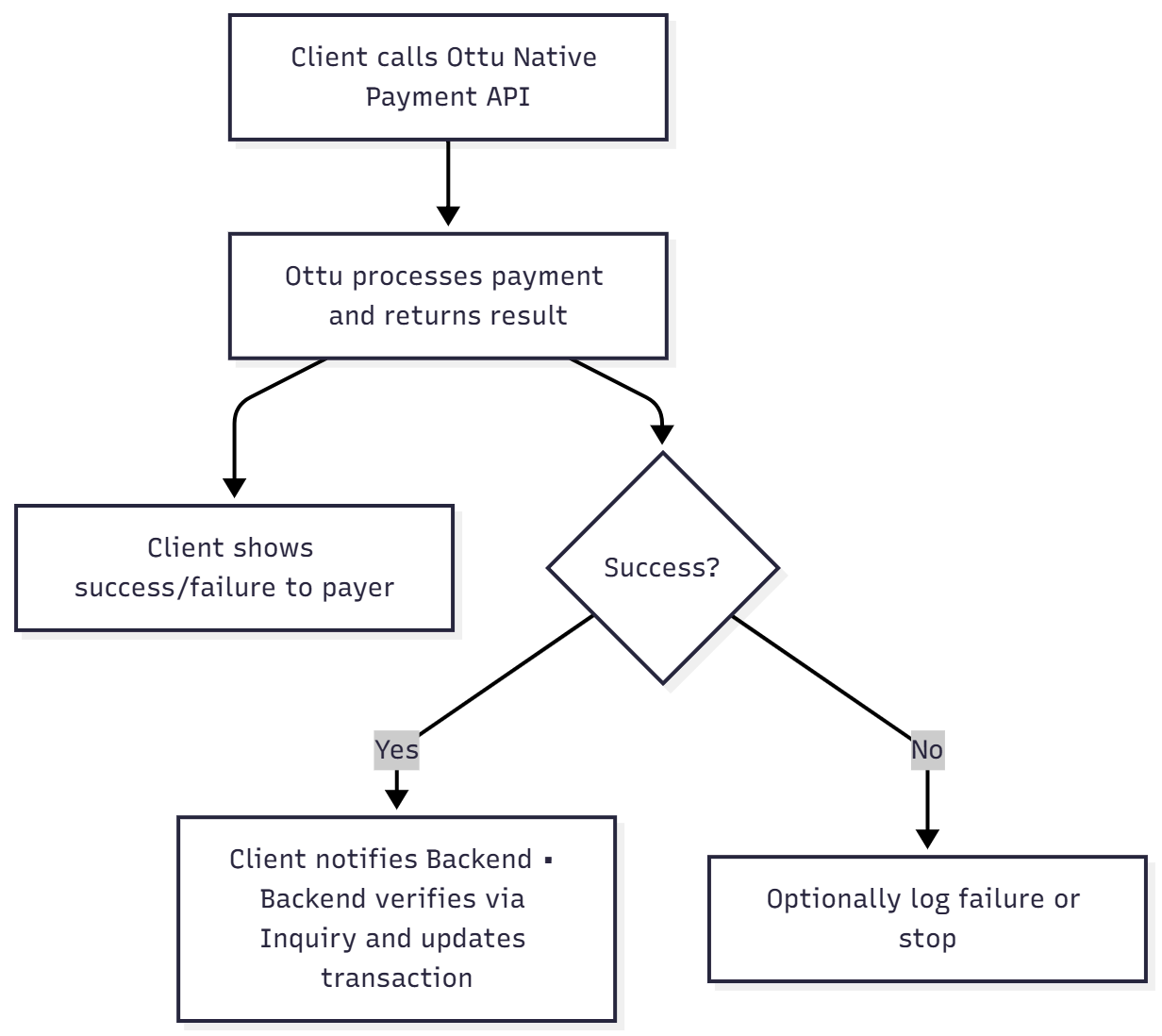
1. **Client → Ottu (**[Public API Key](https://docs.ottu.com/authentication#public-key) **)**
1. The client collects the wallet or tokenized payment payload and calls the Native Payment API directly using the [Public API Key](https://docs.ottu.com/authentication#public-key).
2. The client receives the API callback response.
If the call is made from the client side, the backend must be synchronized with the payment result by ensuring that one of the following actions is performed:
* The API response is forwarded to the backend, **or**
* The [Payment Status (Inquiry) API](https://docs.ottu.com/developer/payment-status-inquiry) is called by the backend after the client confirms that the payment has been completed.
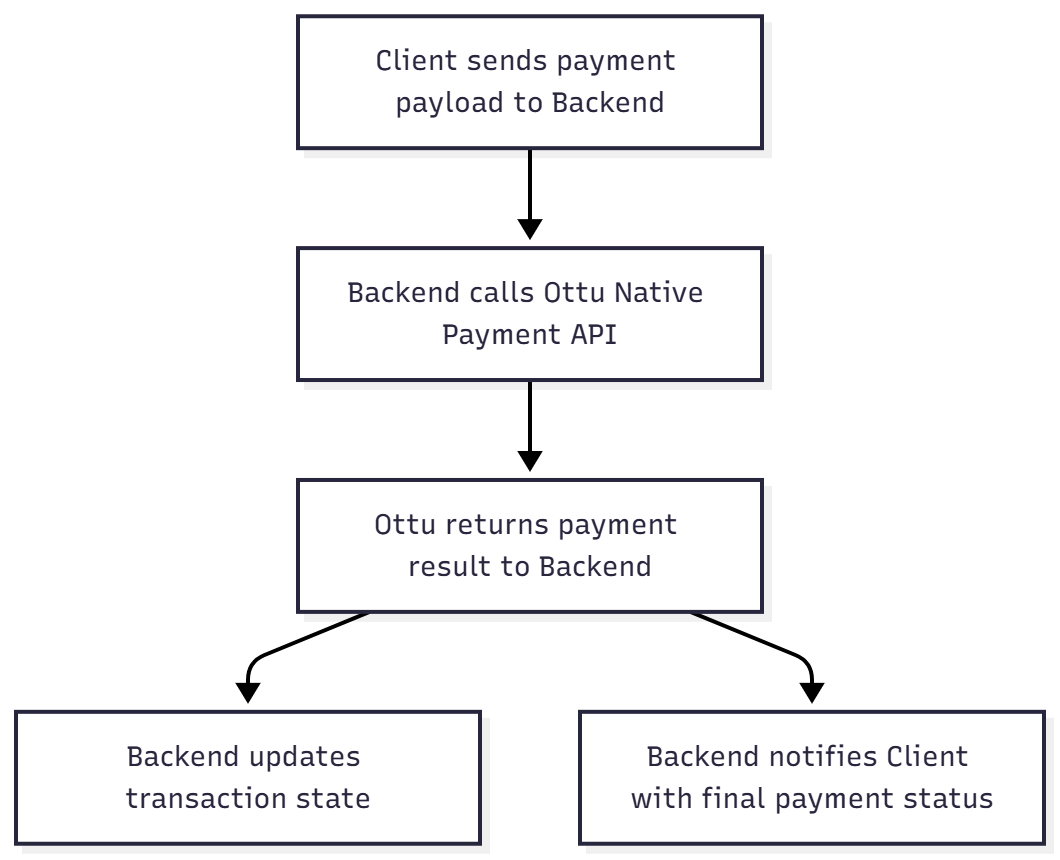
2. **Client → Backend → Ottu (**[Private API Key](https://docs.ottu.com/authentication#private-key-api-key)**– Recommended)**
1. The client sends the payment payload to Backend
2. Backend calls Ottu native payment API
3. Backend receive payment response callback
4. Backend process callback response and notify client side with payment status
## [Setup](#setup)
* A valid [session\_id](https://docs.ottu.com/checkout-api#session_id-string-mandatory) obtained from the [Checkout API](https://docs.ottu.com/developer/checkout-api).
* A Merchant Gateway ID (MID) with the payment service activated and properly configured in Ottu.
To complete the setup, the **Service Setup** section for the specific payment service being implemented must be followed, such as:
* [Apple Pay](#apple-pay)
* [Google Pay](#google-pay)
* [Auto-Debit (Tokenized Payments)](#auto-debit-tokenized-payments)
If multiple gateways are configured, always include the [pg\_code](https://docs.ottu.com/checkout-api#pg_codes-array-required) corresponding to the MID that has the target payment service enabled.\
**Example:**\
If a transaction has `knet` and `mpgs` `pg_code` but only `knet` supports Apple Pay, you must send \
`pg_code`: `knet` when calling the Apple Pay API.
#### [Checklist](#checklist)
* [x] Created a valid [session\_id](https://docs.ottu.com/checkout-api#session_id-string-mandatory).
* [x] Completed Apple Pay / Google Pay setup (if applicable).
* [x] Selected the correct invocation model (client or backend).
* [x] Used the appropriate API key type ([Public API Key](https://docs.ottu.com/authentication#public-key) vs. [Private API Key](https://docs.ottu.com/authentication#private-key-api-key)).
* [x] Sent wallet payment payload or gateway token (no raw card data).
* [x] Implemented backend sync logic.
## [Apple Pay](#apple-pay)
{% hint style="info" %}
The prerequisites and [checklist](#checklist) mentioned in the general [Setup](#setup) section should be applied. They can be accessed [here](#setup).
{% endhint %}
#### [Setup](#setup-1)
1. Apple Pay is configured on the client side (iOS / web).
2. The encrypted `paymentData` object is collected from Apple Pay.
3. The payload, along with the [session\_id](https://docs.ottu.com/checkout-api#session_id-string-mandatory), is sent to the Ottu Payment API.
4. Ottu processes via the configured Apple Pay gateway and returns a unified result (`succeeded`, `failed`).
{% hint style="danger" %}
* Do not modify the Apple Pay payload. Any change invalidates token decryption.
* Include [pg\_code](https://docs.ottu.com/developer/broken-reference) if multiple gateways are configured.
{% endhint %}
#### [API Schema Reference](#api-schema-reference)
## Native Payment API(Apple Pay)
> Allows merchants to submit an Apple Pay payment directly via server-to-server integration. This endpoint requires private key authentication and expects a valid Apple Pay token structure in the request payload under \`payload\`. \
> \
> Typical use case: The merchant collects the Apple Pay token on their frontend and sends it to this endpoint along with session and amount information.
```json
{"openapi":"3.1.1","info":{"title":"Ottu API","version":"1.0.0"},"servers":[{"url":"https://sandbox.ottu.net"}],"security":[{"basicAuth":[]},{"SSO_BasicAuth":[]}],"components":{"securitySchemes":{"basicAuth":{"type":"http","scheme":"basic"},"SSO_BasicAuth":{"type":"http","scheme":"basic"}},"schemas":{"ApplePayDirectPayment":{"type":"object","properties":{"payload":{"$ref":"#/components/schemas/ApplePayToken"},"pg_code":{"type":["string","null"],"description":"The unique pg_code used for this payment instrument."},"session_id":{"type":"string","description":"A unique identifier for the payment transaction (session)."}},"required":["payload","session_id"]},"ApplePayToken":{"type":"object","properties":{"paymentData":{"allOf":[{"$ref":"#/components/schemas/ApplePaymentData"}],"description":"Encrypted Apple Pay payment data containing the payment amount, merchant ID, and other transaction details. This payload is decrypted by the payment gateway to complete the transaction."},"paymentMethod":{"allOf":[{"$ref":"#/components/schemas/PaymentMethod"}],"description":"Describes the payment method selected by the customer, including card network (e.g., Visa), type (e.g., debit), and display name."},"transactionIdentifier":{"type":"string"}},"required":["paymentData","paymentMethod","transactionIdentifier"]},"ApplePaymentData":{"type":"object","properties":{"version":{"type":"string"},"data":{"type":"string"},"signature":{"type":"string"},"header":{"allOf":[{"$ref":"#/components/schemas/Header"}],"description":"Cryptographic header used to decrypt the Apple Pay payment data. Includes the public key hash, ephemeral public key, wrapped key, and transaction ID."}},"required":["data","header","signature","version"]},"Header":{"type":"object","properties":{"ephemeralPublicKey":{"type":"string"},"wrappedKey":{"type":"string"},"publicKeyHash":{"type":"string"},"transactionId":{"type":"string"}},"required":["publicKeyHash","transactionId"]},"PaymentMethod":{"type":"object","properties":{"displayName":{"type":"string"},"network":{"type":"string"},"type":{"type":"string"}},"required":["displayName","network","type"]},"SchemaWebhook":{"type":"object","properties":{"pg_params":{"allOf":[{"$ref":"#/components/schemas/PGParams"}],"readOnly":true,"description":"The `pg_params` field contains the details received \nfrom the payment gateway callback these details are \nprovided to us by the gateway after a user has completed \na payment transaction additionally, `pg_params` \ncan include information obtained from an inquiry \nrequest made to the payment gateway status check API. \n"},"agreement":{"allOf":[{"$ref":"#/components/schemas/Agreement"}],"readOnly":true,"description":"An established contractual arrangement with the payer, which authorizes you to securely store and subsequently utilize their payment information for specific purposes. This could encompass arrangements like recurring payments for services such as mobile subscriptions, installment-based payments for purchases, arrangements for ad-hoc charges like account top-ups, or for standard industry practices like penalty charges for missed appointments. \n\nNote: If your intention is solely to store payment details for transactions initiated by the payer in the future, then this parameter group should not be used."},"amount":{"type":"string","readOnly":true,"description":"Denotes the total sum of the payment transaction, which encompasses the cost of the procured items or services, excluding any supplementary fees or charges."},"amount_details":{"allOf":[{"$ref":"#/components/schemas/AmountDetails"}],"readOnly":true,"description":"A comprehensive set of amount details includes: Currency Code, Amount, Total, Fee."},"capture_delivery_address":{"type":"boolean","description":"By enabling this, you will ask for user's address. If enabled, capture delivery coordinates should also be active."},"capture_delivery_location":{"type":"boolean","title":"Capture delivery coordinates","description":"By enabling this, you will ask for user's delivery location on a map. "},"card_acceptance_criteria":{"allOf":[{"$ref":"#/components/schemas/CardAcceptanceCriteria"}],"readOnly":true,"description":"This field allows you to define specific rules and conditions that a card must meet to be eligible for payment. These stipulations apply regardless of whether a customer chooses to pay using a saved card or opts to add a new card for the transaction. By leveraging the `card_acceptance_criteria`, you gain the power to fine-tune your payment processing strategy, tailoring acceptance rules to align with your business needs, security standards, and risk management policies.\n\n**Example**: If you run an exclusive service that caters predominantly to premium customers, you might set criteria that only allow transactions from high-tier credit cards like VISA Platinum. This ensures that payments align with the exclusivity and branding of your services. Remember to configure these criteria thoughtfully. Striking the right balance between security, risk mitigation, and user experience is paramount.\n\n**Note**: The `card_acceptance_criteria` field is applicable only for direct payments and not for hosted session payments."},"currency_code":{"type":"string","description":"The specified currency represents the denomination of the transaction.Nevertheless, it doesn't necessarily mandate payment in this exact currency.Due to potential currency conversions or exchanges, the final charge may be in a different currency.","maxLength":3,"minLength":3},"customer_address_city":{"type":"string","description":"The city of the customer's billing address. This field may be used to send the billing address to the payment gateway.","maxLength":40},"customer_address_country":{"type":"string","description":"The country of the customer's billing address, formatted as a two-letter ISO country code (e.g., 'US' for United States, 'CA' for Canada). This field may be used to send the billing address to the payment gateway.","maxLength":2,"minLength":2},"customer_address_line1":{"type":"string","title":"Customer address line 1","description":"The first line of the customer's billing street address. This field may be used to send the billing address to the payment gateway."},"customer_address_line2":{"type":"string","title":"Customer address line 2","description":"The second line of the customer's billing street address, if available. This field may be used to provide additional address information, such as an apartment or suite number."},"customer_birthdate":{"type":["string","null"],"format":"date","description":"The customer's date of birth in ISO format (YYYY-MM-DD)."},"customer_address_postal_code":{"type":"string","description":"The postal code of the customer's billing address. This field may be used to send the billing address to the payment gateway.","maxLength":12},"customer_address_state":{"type":"string","description":"The state or region of the customer's billing address. This field may be used to send the billing address to the payment gateway.","maxLength":40},"customer_email":{"type":"string","description":"The email address of the customer that is used to send payment notifications and receipts, and can be used for fraud prevention. This field is mandatory and is always sent to the payment gateway. It may also be included in the invoice, receipt, email, and displayed on the payment page.","maxLength":128},"customer_first_name":{"type":"string","description":"The first name of the recipient of the payment. This field is used for various communications such as the invoice, receipt, email, SMS, or displayed on the payment page. It may also be sent to the payment gateway if necessary.","maxLength":64},"customer_id":{"type":"string","description":"The customer ID is a unique identifier for the customer within the merchant's system. It is also used as a merchant identifier for the customer and plays a critical role in tokenization. All the customer's cards will be associated with this ID.","maxLength":64},"customer_last_name":{"type":"string","description":"The last name of the recipient of the payment. This field is used for various communications such as the invoice, receipt, email, SMS, or displayed on the payment page. It may also be sent to the payment gateway if necessary.","maxLength":64},"customer_phone":{"type":"string","description":"Customer phone number associated with the payment. This might be sent to the payment gateway and depending on the gateway, it may trigger a click to pay process on the payment page. The phone number will also be included in the invoice, receipt, email, and displayed on the payment page.","maxLength":32},"extra":{"description":"The extra information for the payment details, which the merchant has sent it in key value form."},"fee":{"type":"string","description":"The fee denotes the sum the customer pays in their chosen payment currency. This may vary from the transaction's designated currency. The fee is computed once to maintain precision and uniformity throughout the payment procedure.","readOnly":true},"gateway_account":{"type":"string","readOnly":true,"description":"This code corresponds to the payment gateway and plays an essential role in facilitating payment transactions."},"gateway_name":{"type":"string","readOnly":true,"description":"The name of the payment gateway service being utilized."},"gateway_response":{"type":"object","additionalProperties":{},"description":"This field stores the processed response received from the payment gateway and forwarded to Ottu.","readOnly":true},"initiator":{"allOf":[{"$ref":"#/components/schemas/InitiatorUser"}],"description":"The user who initiated the creation of this payment transaction, if available. This field is optional and may be used to track who created the payment transaction. Note that if the payment transaction was using API Key auth initiator_id can be set to any value that corresponds to an existing ACTIVE user in the system"},"is_sandbox":{"type":"boolean","title":"Is Sandbox?","description":"Indicates whether the operation was performed in a test environment or not."},"message":{"type":"string","readOnly":true,"description":"This represents the message, either transmitted by the Payment Gateway (PG) or established by Ottu, that provides a detailed illustration of the payment's current status."},"order_no":{"type":["string","null"],"description":"The unique identifier assigned to this payment transaction. It is used for tracking purposes and is set by the merchant or the system.","maxLength":128},"paid_amount":{"oneOf":[{"type":"number","format":"double"},{"type":"string"}],"description":"The paid amount encompasses fees or captured amounts from authorized transactions. This total is derived from the specified 'amount' field, converting foreign currencies to the default as necessary. This might result in minor variations due to fluctuations in exchange rates.","readOnly":true},"payment_type":{"enum":["one_off","auto_debit","save_card"],"type":"string","description":"Type of payment. Choose `one_off` for payments that occur only once without future commitments. Choose `auto_debit` for payments that are automatically deducted, such as recurring subscriptions, installments, or unscheduled auto-debits. \n\nChoose `save_card` if you want to perform a card tokenization operation.\n\nNOTE: If `auto_debit` is selected: \n1. `agreement` and `customer_id` parameters will also be mandatory. \n2. Only PG codes supporting tokenization can be selected. \nAs a side effect, the card used for the payment will be associated with the supplied `agreement.id`. This card will be locked, preventing the customer from deleting it from the system until an alternate card is chosen for auto-debit payments.\n\nNOTE: If `save_card` is selected: \n1. The amount must be zero for the save card operation. \n2. The selected MID(pg_code) must support tokenization to enable the save card operation. \n3. Please note that the save card operation is considered successful without any funds being charged.\n4. Once a card is created, Ottu will send a webhook containing the card details to the merchant's webhook URL.\n5. When the transaction type is `save_card`, all previously saved cards returned in the sdk_preload_payload should be hidden since the user is saving a new card and does not need to select from existing ones.\n\n* `one_off` - One Off\n* `auto_debit` - Auto Debit\n* `save_card` - Save Card"},"reference_number":{"type":"string","readOnly":true},"refunded_amount":{"type":"number","format":"double","description":"The total refunded amount for the payment transaction."},"remaining_amount":{"type":"number","format":"double","description":"The residual amount due. Together with the editable amount, it indicates the outstanding balance of a transaction awaiting settlement.","readOnly":true},"result":{"enum":["pending","success","failed","canceled","error","cod"],"type":"string","description":"Indicates the outcome of the operation. `success` denotes a successful operation.","readOnly":true},"session_id":{"type":"string","description":"A unique identifier for each payment transaction, used to maintain the session state during the payment process.","maxLength":128},"settled_amount":{"type":"number","format":"double","description":"The amount that has been paid or authorized in its original currency, excluding any fees.","readOnly":true},"signature":{"type":"string","readOnly":true,"description":"Signature Field: A cryptographic hash used to guarantee data integrity and authenticity during client-server exchanges. This hash ensures that the API payload has not been tampered with, and can only be verified by authorized parties."},"state":{"type":"string","readOnly":true},"token":{"allOf":[{"$ref":"#/components/schemas/Card"}],"description":"Please note that if card is created via checkout save_card payment type\n\nIt means card is created via successful operation without any funds charged.\n\nFor more details check Checkout API `payment_type` field documentation details"},"transaction_log_id":{"type":["integer","null"],"maximum":2147483647,"minimum":0,"description":"Identifies the transaction log associated with the payment transaction. A transaction log is created for each record that is dispatched during a bulk dispatch process."},"timestamp_utc":{"type":"string","format":"date-time","readOnly":true,"description":"This field represents the timestamp at which ottu processed the transaction.While this often corresponds to the payment time,it's important to note that it might not always be the case.Payments can be acknowledged at a later time,so this timestamp might not align precisely with the actual payment time."},"transactions":{"type":"array","items":{"$ref":"#/components/schemas/ChildPayment"},"description":"A list of dictionaries is generated, each containing a concise summary of each child payment transaction that has been created."},"voided_amount":{"type":"number","format":"double","description":"The total voided amount for the payment transaction."}},"required":["agreement","amount","amount_details","card_acceptance_criteria","currency_code","customer_address_country","fee","gateway_account","gateway_name","gateway_response","message","paid_amount","pg_params","reference_number","remaining_amount","result","settled_amount","signature","state","timestamp_utc"]},"PGParams":{"type":"object","description":"Serializer for PaymentTransaction with dynamically generated fields.","properties":{"auth_code":{},"card_type":{},"card_holder":{},"cardholder_email":{},"card_expiry_month":{},"card_expiry_year":{},"full_card_expiry":{},"card_number":{},"card_issuer":{},"ref":{},"result":{},"track_id":{},"post_date":{},"transaction_id":{},"payment_id":{},"pg_message":{},"receipt_no":{},"transaction_no":{},"decision":{},"card_expiry":{},"card_details":{},"dcc_payer_amount":{},"dcc_payer_currency":{},"dcc_payer_exchange_rate":{},"rrn":{}}},"Agreement":{"type":"object","description":"Serializer to hold the recurring data information.\nThis is required for being able to create recurring payments and the PGs\nrequire this information.","properties":{"id":{"type":"string","description":"A unique identifier for the agreement established with the payer. This ID links to the specific terms and conditions the payer has authorized for processing their stored card details. Use cases include: \n1. Recurring Payments: Periodic debits, e.g., gym memberships. \n2. Installment Payments: Multiple charges for a single purchase over time. \n3. Unscheduled: Future payments as required, e.g., account top-ups. \n4. Industry Practice: Standard business practices related to an original payment, e.g., hotel charges after checkout.","maxLength":128},"amount_variability":{"enum":["fixed","variable"],"type":"string","description":"Indicates if all payments within the agreement use the same amount or if the amount differs between the payments.\n\n* `fixed` - Fixed\n* `variable` - Variable"},"start_date":{"type":"string","format":"date","description":"Date on which the agreement with the payer to process payments starts."},"expiry_date":{"type":"string","format":"date","description":"Date on which your agreement with the payer to process payments expires."},"max_amount_per_cycle":{"type":"string","format":"decimal","description":"The maximum amount for a single payment in the series as agreed with the payer."},"cycle_interval_days":{"type":"integer","maximum":366,"minimum":1,"description":"The minimum number of days between payments agreed with the payer."},"total_cycles":{"type":"integer","maximum":999,"minimum":1,"description":"The number of merchant-initiated payments within the recurring payment agreement."},"frequency":{"enum":["irregular","daily","weekly","semi_monthly","monthly","quarterly","semi_annually","yearly","other"],"type":"string","description":"The frequency of the payments within the series as agreed with the payer.\n\n* `irregular` - Irregular\n* `daily` - Daily\n* `weekly` - Weekly\n* `semi_monthly` - Semi Monthly\n* `monthly` - Monthly\n* `quarterly` - Quarterly\n* `semi_annually` - Semi Annually\n* `yearly` - Yearly\n* `other` - Other"},"type":{"enum":["event_based","installment","recurring","unscheduled","other"],"type":"string","default":"recurring","description":"The type of commercial agreement that the payer has with the merchant.\n\n *Note*: For `unscheduled` agreements, the allowed values should be configured as follows: \n\n `id` - Accepts any value. \n\n `frequency`. \n\n `type`.\n\n This configuration ensures that only specific values are permitted for each field when the `type` is `Unscheduled`.\n\n *Note*: For `recurring` agreements, the following fields are mandatory as follows: \n\n `amount_variability` \n\n `cycle_interval_days` \n\n `expiry_date` \n\n ` `requency` \n\n `id` \n\n `total_cycles` \n\n This configuration ensures that the required values are mandatory for each field when the `type` is `Recurring`.\n\n* `event_based` - Event Based\n* `installment` - Installment\n* `recurring` - Recurring\n* `unscheduled` - Unscheduled\n* `other` - Other"},"seller":{"allOf":[{"$ref":"#/components/schemas/AgreementSeller"}],"description":"Details about the retailer, if the agreement is for installment payments."}}},"AgreementSeller":{"type":"object","properties":{"name":{"type":"string","description":"The retailer's trading name.","maxLength":128},"short_name":{"type":"string","description":"Abbreviation of the retailer's trading name, suitable for payer's statement display.","maxLength":64},"category_code":{"type":"string","description":"A 4-digit code classifying the retailer's business by the type of goods or services it offers.","maxLength":64}}},"AmountDetails":{"type":"object","properties":{"currency_code":{"type":"string","readOnly":true},"amount":{"type":"string","description":"Represents the total amount of the payment transaction, which includes the cost of the purchased items or services but excludes any additional fees or charges","maxLength":120},"total":{"type":"string","readOnly":true,"description":"Denotes the comprehensive total of the payment transaction, incorporating both the principal amount and any associated fees."},"fee":{"type":"string","readOnly":true,"description":"The `Fee` indicates the sum disbursed by the customer in their chosen currency for the payment. Note, this currency could vary from the currency used for the transaction."},"exchange_rate":{"type":"string","description":"The conversion rate used for currency conversion during payment. This value reflects the rate locally calculated."}},"required":["currency_code","fee","total"]},"CardAcceptanceCriteria":{"type":"object","properties":{"min_expiry_time":{"type":"integer","maximum":365,"minimum":1,"description":"Specifies the minimum required validity period, in days, for a card to be eligible for payment. If set to 30 days, for example, cards set to expire within the next month would be declined. This ensures short-lived cards nearing their expiration date are filtered out, reducing chances of payment failures. When implementing, balance your operational needs with customer convenience. Setting it too stringent might increase payment declines, while a lenient approach could risk future payment failures.\n\nAdditionally, it defaults to 30 days when the `payment_type` is `auto_debit`. If any other payment type is selected, no default value is set."}}},"InitiatorUser":{"type":"object","properties":{"id":{"type":"integer","readOnly":true},"first_name":{"type":"string","maxLength":32},"last_name":{"type":"string","maxLength":32},"username":{"type":"string","description":"Required. 150 characters or fewer. Letters, digits and @/./+/-/_ only.","pattern":"^[\\w.@+-]+$","maxLength":150},"email":{"type":"string","format":"email","title":"Email address","maxLength":254},"phone":{"type":"string","title":"Phone number","maxLength":128}},"required":["email","id","username"]},"Card":{"type":"object","description":"Represents token details, only if the user pays with a tokenized card, Ottu will include the token details in the response.","properties":{"brand":{"type":["string","null"],"description":"The card brand (e.g., Visa, Mastercard) associated with the card. Display this information for customer reference.","maxLength":32},"customer_id":{"type":"string","description":"The unique identifier for the customer who owns the card","maxLength":36},"cvv_required":{"type":"boolean","description":"Specifies if the card requires the submission of a CVV for transactions. A card without CVV requirement can be used for auto-debit or recurring payments."},"expiry_month":{"type":"string","description":"The card's expiration month. Provide this information for transaction processing and validation.","maxLength":2},"expiry_year":{"type":"string","description":"The card's expiration year. Provide this information for transaction processing and validation.","maxLength":2},"is_expired":{"type":"boolean","description":"A boolean field indicating whether the card has expired. Use this information to determine if the card is valid for transactions and to notify the customer if necessary."},"is_preferred":{"type":"boolean","readOnly":true,"description":" Indicates if the card is the customer's preferred payment option. Order cards with this attribute set to true at the top of the list for easy access."},"name_on_card":{"type":["string","null"],"description":"The cardholder's name as it appears on the card. Display this information for customer verification.","maxLength":64},"number":{"type":["string","null"],"description":"The masked card number to be displayed, ensuring customer privacy and security while providing essential information.","maxLength":19},"pg_code":{"type":"string","description":"The `pg_code` associated with the card's creation."},"pg_name":{"enum":["knet","cybersource","csuc","checkoutcom","migs","dapi","deema","doku","burgan","paypal","mpgs","kpay","enet","omannet","benefit","benefit_pay","blank","cbk","fss","myfatoorah","ngenius","ifg","ccavenues","payu_india","cod","amazon_pay","ottu_pg","bookeey","upg","bambora","hyperpay","qpay","smart_pay","sohar","nbo","tabby","tamara","hesabe","rajhi","stc_pay","stcbahrain","urpay","beyon_money","upayments","tap","fawry","fiserv","payon","paymob","moyasar","abapayway","skipcash","taly"],"type":"string","description":"The payment `gateway` associated with the user's card.\n\n* `knet` - Knet\n* `cybersource` - CyberSource\n* `csuc` - Cybersource Unified Checkout\n* `checkoutcom` - checkout.com\n* `migs` - MiGS\n* `dapi` - Dapi\n* `deema` - Deema\n* `doku` - Doku\n* `burgan` - Burgan\n* `paypal` - PayPal\n* `mpgs` - MPGS\n* `kpay` - KPay\n* `enet` - Enet\n* `omannet` - OmanNet\n* `benefit` - Benefit\n* `benefit_pay` - BenefitPay\n* `blank` - Blank\n* `cbk` - CBK\n* `fss` - FSS\n* `myfatoorah` - MyFatoorah\n* `ngenius` - N-Genius\n* `ifg` - IATA Financial Gateway\n* `ccavenues` - Ccavenues\n* `payu_india` - PayU India\n* `cod` - Cash\n* `amazon_pay` - Amazon Pay\n* `ottu_pg` - Ottu PG\n* `bookeey` - Bookeey\n* `upg` - UPG\n* `bambora` - Bambora\n* `hyperpay` - HyperPay\n* `qpay` - Qpay\n* `smart_pay` - SmartPay\n* `sohar` - SoharInternational\n* `nbo` - NBO\n* `tabby` - Tabby\n* `tamara` - Tamara\n* `hesabe` - Hesabe\n* `rajhi` - Alrajhi Bank\n* `stc_pay` - STC Pay\n* `stcbahrain` - STC Bahrain\n* `urpay` - URPay\n* `beyon_money` - BeyonMoney\n* `upayments` - UPayments\n* `tap` - Tap Payments\n* `fawry` - Fawry\n* `fiserv` - Fiserv\n* `payon` - PayOn\n* `paymob` - PayMob\n* `moyasar` - Moyasar\n* `abapayway` - ABA PayWay\n* `skipcash` - Skip Cash\n* `taly` - Taly"},"token":{"type":"string","description":"The unique token associated with the card, required for tokenized card payments. Use this value to securely process transactions.","maxLength":50},"agreements":{"description":"List of agreements associated with this card."}},"required":["agreements","brand","customer_id","cvv_required","expiry_month","expiry_year","is_expired","is_preferred","name_on_card","number","pg_code","pg_name","token"]},"ChildPayment":{"type":"object","properties":{"amount":{"type":"string","readOnly":true},"currency_code":{"type":"string","description":"The specified currency represents the denomination of the transaction.Nevertheless, it doesn't necessarily mandate payment in this exact currency.Due to potential currency conversions or exchanges, the final charge may be in a different currency.","maxLength":3,"minLength":3},"order_no":{"type":["string","null"],"description":"The unique identifier assigned to this payment transaction. It is used for tracking purposes and is set by the merchant or the system.","maxLength":128},"session_id":{"type":"string","description":"A unique identifier for each payment transaction, used to maintain the session state during the payment process.","maxLength":128},"state":{"enum":["paid","refunded","refund_queued","refund_rejected","voided"],"type":"string","description":"The current state of the payment transaction, it helps to understand the progress of the payment.\n\n* `paid` - paid\n* `refunded` - refunded\n* `refund_queued` - refund_queued\n* `refund_rejected` - refund_rejected\n* `voided` - voided"}},"required":["amount","currency_code"]},"DirectApplePaymentErrors":{"oneOf":[{"$ref":"#/components/schemas/OperationErrorResponse"},{"$ref":"#/components/schemas/FieldErrors"}]},"OperationErrorResponse":{"type":"object","properties":{"detail":{"type":"string","description":"A human-readable description providing details about the failure.","maxLength":255},"result":{"type":"string","default":"failed","description":"Indicates the outcome of the operation. Typically set to 'failed' for error responses."}}},"FieldErrors":{"type":"object","properties":{"field_name":{"type":"array","items":{"type":"string","default":"This field is required."}}}},"GenericErrorMessage":{"type":"object","properties":{"detail":{"type":"string"}},"required":["detail"]}}},"paths":{"/b/pbl/v2/payment/apple-pay/":{"post":{"operationId":"apple_direct_payment","description":"Allows merchants to submit an Apple Pay payment directly via server-to-server integration. This endpoint requires private key authentication and expects a valid Apple Pay token structure in the request payload under `payload`. \n\nTypical use case: The merchant collects the Apple Pay token on their frontend and sends it to this endpoint along with session and amount information.","summary":"Native Payment API(Apple Pay)","tags":["Payment Operations"],"requestBody":{"content":{"application/json":{"schema":{"$ref":"#/components/schemas/ApplePayDirectPayment"}},"application/x-www-form-urlencoded":{"schema":{"$ref":"#/components/schemas/ApplePayDirectPayment"}},"multipart/form-data":{"schema":{"$ref":"#/components/schemas/ApplePayDirectPayment"}}},"required":true},"responses":{"200":{"content":{"application/json":{"schema":{"$ref":"#/components/schemas/SchemaWebhook"}}},"description":""},"400":{"content":{"application/json":{"schema":{"$ref":"#/components/schemas/DirectApplePaymentErrors"}}},"description":""},"401":{"content":{"application/json":{"schema":{"$ref":"#/components/schemas/GenericErrorMessage"}}},"description":""}}}}}}
```
## [Google Pay](#google-pay)
{% hint style="info" %}
The prerequisites and [checklist](#checklist) mentioned in the general [Setup](#setup) section should be applied. They can be accessed [here](#setup).
{% endhint %}
#### [Setup](#setup-2)
1. Google Pay is configured on the client side (Android / web).
2. The wallet payment payload (`paymentMethodData`, `email`, `addresses`, etc.) is collected.
3. The payload, along with the [session\_id](https://docs.ottu.com/checkout-api#session_id-string-mandatory) is sent to the Ottu Native Payment API.
4. Ottu processes through the configured gateway and returns a normalized response.
{% hint style="warning" %}
* Do not modify the Google Pay payload. Any change invalidates token decryption.
* Include [pg\_code](https://docs.ottu.com/developer/broken-reference) if multiple gateways are configured.
* If the response contains type: "iframe", render it for 3D Secure authentication.Important:
{% endhint %}
#### [API Schema Reference](#api-schema-reference-1)
## Native Payment API(Google Pay)
> Allows merchants to submit an Google Pay payment directly via server-to-server integration. This endpoint requires private key authentication and expects a valid Google Pay token structure in the request payload under \`payload\`. \
> \
> Typical use case: The merchant collects the Google Pay token on their frontend and sends it to this endpoint along with session and amount information.
````json
{"openapi":"3.1.1","info":{"title":"Ottu API","version":"1.0.0"},"servers":[{"url":"https://sandbox.ottu.net"}],"security":[{"basicAuth":[]},{"SSO_BasicAuth":[]}],"components":{"securitySchemes":{"basicAuth":{"type":"http","scheme":"basic"},"SSO_BasicAuth":{"type":"http","scheme":"basic"}},"schemas":{"GooglePayDirectPayment":{"type":"object","properties":{"payload":{"$ref":"#/components/schemas/GooglePayPaymentData"},"pg_code":{"type":["string","null"],"description":"The unique pg_code used for this payment instrument."},"session_id":{"type":"string","description":"A unique identifier for the payment transaction (session)."}},"required":["payload","session_id"]},"GooglePayPaymentData":{"type":"object","description":"Serializer for Google Pay payment, which is used to validate\nthe payment data sent from the SDK client.\n\nOrderSerializer must be added also in the mixin classes\nfor minimal amount validation\n\nThis deserialize the data sent from the SDK client, namely the\npaymentData https://developers.google.com/pay/api/web/reference/response-objects#PaymentData\n\n{\n \"apiVersion\": 2,\n \"apiVersionMinor\": 0,\n \"paymentMethodData\": {\n \"type\": \"CARD\",\n \"description\": \"Visa 1234\",\n \"info\": {\n \"cardNetwork\": \"VISA\",\n \"cardDetails\": \"1234\",\n \"billingAddress\": {\n \"name\": \"John Smith\",\n \"phoneNumber\": \"+16505551234\",\n \"postalAddress\": {\n \"addressLines\": [\"1234 Main Street\"],\n \"locality\": \"Mountain View\",\n \"administrativeArea\": \"CA\",\n \"postalCode\": \"94043\",\n \"countryCode\": \"US\",\n },\n },\n },\n \"tokenizationData\": {\n \"type\": \"PAYMENT_GATEWAY\",\n \"token\": \"dummy_payment_token\",\n },\n },\n \"email\": \"customer@example.com\",\n \"shippingAddress\": {\n \"name\": \"John Smith\",\n \"phoneNumber\": \"+16505551234\",\n \"postalAddress\": {\n \"addressLines\": [\"1234 Main Street\"],\n \"locality\": \"Mountain View\",\n \"administrativeArea\": \"CA\",\n \"postalCode\": \"94043\",\n \"countryCode\": \"US\",\n },\n },\n}","properties":{"apiVersion":{"type":"integer","description":"The version of the Google Pay API used to process the payment."},"apiVersionMinor":{"type":"integer","description":"The minor version of the Google Pay API used to process the payment."},"paymentMethodData":{"allOf":[{"$ref":"#/components/schemas/PaymentMethodData"}],"description":"The payment method data."},"email":{"type":"string","format":"email","description":"The email address of the customer."},"shippingAddress":{"type":"object","additionalProperties":{},"description":"The shipping address of the customer."}},"required":["apiVersion","apiVersionMinor","paymentMethodData"]},"PaymentMethodData":{"type":"object","description":"https://developers.google.com/pay/api/web/reference/response-objects#PaymentMethodData","properties":{"type":{"type":"string","description":"The type of payment method data."},"description":{"type":"string","description":"The description of the payment method."},"info":{"type":"object","additionalProperties":{},"description":"The payment method info."},"tokenizationData":{"type":"object","additionalProperties":{},"description":"The tokenization data."}},"required":["description","info","tokenizationData","type"]},"DirectGooglePaymentSuccess":{"oneOf":[{"$ref":"#/components/schemas/SchemaWebhook"},{"$ref":"#/components/schemas/IFrame3DSResponse"},{"$ref":"#/components/schemas/Redirect3DSResponse"}]},"SchemaWebhook":{"type":"object","properties":{"pg_params":{"allOf":[{"$ref":"#/components/schemas/PGParams"}],"readOnly":true,"description":"The `pg_params` field contains the details received \nfrom the payment gateway callback these details are \nprovided to us by the gateway after a user has completed \na payment transaction additionally, `pg_params` \ncan include information obtained from an inquiry \nrequest made to the payment gateway status check API. \n"},"agreement":{"allOf":[{"$ref":"#/components/schemas/Agreement"}],"readOnly":true,"description":"An established contractual arrangement with the payer, which authorizes you to securely store and subsequently utilize their payment information for specific purposes. This could encompass arrangements like recurring payments for services such as mobile subscriptions, installment-based payments for purchases, arrangements for ad-hoc charges like account top-ups, or for standard industry practices like penalty charges for missed appointments. \n\nNote: If your intention is solely to store payment details for transactions initiated by the payer in the future, then this parameter group should not be used."},"amount":{"type":"string","readOnly":true,"description":"Denotes the total sum of the payment transaction, which encompasses the cost of the procured items or services, excluding any supplementary fees or charges."},"amount_details":{"allOf":[{"$ref":"#/components/schemas/AmountDetails"}],"readOnly":true,"description":"A comprehensive set of amount details includes: Currency Code, Amount, Total, Fee."},"capture_delivery_address":{"type":"boolean","description":"By enabling this, you will ask for user's address. If enabled, capture delivery coordinates should also be active."},"capture_delivery_location":{"type":"boolean","title":"Capture delivery coordinates","description":"By enabling this, you will ask for user's delivery location on a map. "},"card_acceptance_criteria":{"allOf":[{"$ref":"#/components/schemas/CardAcceptanceCriteria"}],"readOnly":true,"description":"This field allows you to define specific rules and conditions that a card must meet to be eligible for payment. These stipulations apply regardless of whether a customer chooses to pay using a saved card or opts to add a new card for the transaction. By leveraging the `card_acceptance_criteria`, you gain the power to fine-tune your payment processing strategy, tailoring acceptance rules to align with your business needs, security standards, and risk management policies.\n\n**Example**: If you run an exclusive service that caters predominantly to premium customers, you might set criteria that only allow transactions from high-tier credit cards like VISA Platinum. This ensures that payments align with the exclusivity and branding of your services. Remember to configure these criteria thoughtfully. Striking the right balance between security, risk mitigation, and user experience is paramount.\n\n**Note**: The `card_acceptance_criteria` field is applicable only for direct payments and not for hosted session payments."},"currency_code":{"type":"string","description":"The specified currency represents the denomination of the transaction.Nevertheless, it doesn't necessarily mandate payment in this exact currency.Due to potential currency conversions or exchanges, the final charge may be in a different currency.","maxLength":3,"minLength":3},"customer_address_city":{"type":"string","description":"The city of the customer's billing address. This field may be used to send the billing address to the payment gateway.","maxLength":40},"customer_address_country":{"type":"string","description":"The country of the customer's billing address, formatted as a two-letter ISO country code (e.g., 'US' for United States, 'CA' for Canada). This field may be used to send the billing address to the payment gateway.","maxLength":2,"minLength":2},"customer_address_line1":{"type":"string","title":"Customer address line 1","description":"The first line of the customer's billing street address. This field may be used to send the billing address to the payment gateway."},"customer_address_line2":{"type":"string","title":"Customer address line 2","description":"The second line of the customer's billing street address, if available. This field may be used to provide additional address information, such as an apartment or suite number."},"customer_birthdate":{"type":["string","null"],"format":"date","description":"The customer's date of birth in ISO format (YYYY-MM-DD)."},"customer_address_postal_code":{"type":"string","description":"The postal code of the customer's billing address. This field may be used to send the billing address to the payment gateway.","maxLength":12},"customer_address_state":{"type":"string","description":"The state or region of the customer's billing address. This field may be used to send the billing address to the payment gateway.","maxLength":40},"customer_email":{"type":"string","description":"The email address of the customer that is used to send payment notifications and receipts, and can be used for fraud prevention. This field is mandatory and is always sent to the payment gateway. It may also be included in the invoice, receipt, email, and displayed on the payment page.","maxLength":128},"customer_first_name":{"type":"string","description":"The first name of the recipient of the payment. This field is used for various communications such as the invoice, receipt, email, SMS, or displayed on the payment page. It may also be sent to the payment gateway if necessary.","maxLength":64},"customer_id":{"type":"string","description":"The customer ID is a unique identifier for the customer within the merchant's system. It is also used as a merchant identifier for the customer and plays a critical role in tokenization. All the customer's cards will be associated with this ID.","maxLength":64},"customer_last_name":{"type":"string","description":"The last name of the recipient of the payment. This field is used for various communications such as the invoice, receipt, email, SMS, or displayed on the payment page. It may also be sent to the payment gateway if necessary.","maxLength":64},"customer_phone":{"type":"string","description":"Customer phone number associated with the payment. This might be sent to the payment gateway and depending on the gateway, it may trigger a click to pay process on the payment page. The phone number will also be included in the invoice, receipt, email, and displayed on the payment page.","maxLength":32},"extra":{"description":"The extra information for the payment details, which the merchant has sent it in key value form."},"fee":{"type":"string","description":"The fee denotes the sum the customer pays in their chosen payment currency. This may vary from the transaction's designated currency. The fee is computed once to maintain precision and uniformity throughout the payment procedure.","readOnly":true},"gateway_account":{"type":"string","readOnly":true,"description":"This code corresponds to the payment gateway and plays an essential role in facilitating payment transactions."},"gateway_name":{"type":"string","readOnly":true,"description":"The name of the payment gateway service being utilized."},"gateway_response":{"type":"object","additionalProperties":{},"description":"This field stores the processed response received from the payment gateway and forwarded to Ottu.","readOnly":true},"initiator":{"allOf":[{"$ref":"#/components/schemas/InitiatorUser"}],"description":"The user who initiated the creation of this payment transaction, if available. This field is optional and may be used to track who created the payment transaction. Note that if the payment transaction was using API Key auth initiator_id can be set to any value that corresponds to an existing ACTIVE user in the system"},"is_sandbox":{"type":"boolean","title":"Is Sandbox?","description":"Indicates whether the operation was performed in a test environment or not."},"message":{"type":"string","readOnly":true,"description":"This represents the message, either transmitted by the Payment Gateway (PG) or established by Ottu, that provides a detailed illustration of the payment's current status."},"order_no":{"type":["string","null"],"description":"The unique identifier assigned to this payment transaction. It is used for tracking purposes and is set by the merchant or the system.","maxLength":128},"paid_amount":{"oneOf":[{"type":"number","format":"double"},{"type":"string"}],"description":"The paid amount encompasses fees or captured amounts from authorized transactions. This total is derived from the specified 'amount' field, converting foreign currencies to the default as necessary. This might result in minor variations due to fluctuations in exchange rates.","readOnly":true},"payment_type":{"enum":["one_off","auto_debit","save_card"],"type":"string","description":"Type of payment. Choose `one_off` for payments that occur only once without future commitments. Choose `auto_debit` for payments that are automatically deducted, such as recurring subscriptions, installments, or unscheduled auto-debits. \n\nChoose `save_card` if you want to perform a card tokenization operation.\n\nNOTE: If `auto_debit` is selected: \n1. `agreement` and `customer_id` parameters will also be mandatory. \n2. Only PG codes supporting tokenization can be selected. \nAs a side effect, the card used for the payment will be associated with the supplied `agreement.id`. This card will be locked, preventing the customer from deleting it from the system until an alternate card is chosen for auto-debit payments.\n\nNOTE: If `save_card` is selected: \n1. The amount must be zero for the save card operation. \n2. The selected MID(pg_code) must support tokenization to enable the save card operation. \n3. Please note that the save card operation is considered successful without any funds being charged.\n4. Once a card is created, Ottu will send a webhook containing the card details to the merchant's webhook URL.\n5. When the transaction type is `save_card`, all previously saved cards returned in the sdk_preload_payload should be hidden since the user is saving a new card and does not need to select from existing ones.\n\n* `one_off` - One Off\n* `auto_debit` - Auto Debit\n* `save_card` - Save Card"},"reference_number":{"type":"string","readOnly":true},"refunded_amount":{"type":"number","format":"double","description":"The total refunded amount for the payment transaction."},"remaining_amount":{"type":"number","format":"double","description":"The residual amount due. Together with the editable amount, it indicates the outstanding balance of a transaction awaiting settlement.","readOnly":true},"result":{"enum":["pending","success","failed","canceled","error","cod"],"type":"string","description":"Indicates the outcome of the operation. `success` denotes a successful operation.","readOnly":true},"session_id":{"type":"string","description":"A unique identifier for each payment transaction, used to maintain the session state during the payment process.","maxLength":128},"settled_amount":{"type":"number","format":"double","description":"The amount that has been paid or authorized in its original currency, excluding any fees.","readOnly":true},"signature":{"type":"string","readOnly":true,"description":"Signature Field: A cryptographic hash used to guarantee data integrity and authenticity during client-server exchanges. This hash ensures that the API payload has not been tampered with, and can only be verified by authorized parties."},"state":{"type":"string","readOnly":true},"token":{"allOf":[{"$ref":"#/components/schemas/Card"}],"description":"Please note that if card is created via checkout save_card payment type\n\nIt means card is created via successful operation without any funds charged.\n\nFor more details check Checkout API `payment_type` field documentation details"},"transaction_log_id":{"type":["integer","null"],"maximum":2147483647,"minimum":0,"description":"Identifies the transaction log associated with the payment transaction. A transaction log is created for each record that is dispatched during a bulk dispatch process."},"timestamp_utc":{"type":"string","format":"date-time","readOnly":true,"description":"This field represents the timestamp at which ottu processed the transaction.While this often corresponds to the payment time,it's important to note that it might not always be the case.Payments can be acknowledged at a later time,so this timestamp might not align precisely with the actual payment time."},"transactions":{"type":"array","items":{"$ref":"#/components/schemas/ChildPayment"},"description":"A list of dictionaries is generated, each containing a concise summary of each child payment transaction that has been created."},"voided_amount":{"type":"number","format":"double","description":"The total voided amount for the payment transaction."}},"required":["agreement","amount","amount_details","card_acceptance_criteria","currency_code","customer_address_country","fee","gateway_account","gateway_name","gateway_response","message","paid_amount","pg_params","reference_number","remaining_amount","result","settled_amount","signature","state","timestamp_utc"]},"PGParams":{"type":"object","description":"Serializer for PaymentTransaction with dynamically generated fields.","properties":{"auth_code":{},"card_type":{},"card_holder":{},"cardholder_email":{},"card_expiry_month":{},"card_expiry_year":{},"full_card_expiry":{},"card_number":{},"card_issuer":{},"ref":{},"result":{},"track_id":{},"post_date":{},"transaction_id":{},"payment_id":{},"pg_message":{},"receipt_no":{},"transaction_no":{},"decision":{},"card_expiry":{},"card_details":{},"dcc_payer_amount":{},"dcc_payer_currency":{},"dcc_payer_exchange_rate":{},"rrn":{}}},"Agreement":{"type":"object","description":"Serializer to hold the recurring data information.\nThis is required for being able to create recurring payments and the PGs\nrequire this information.","properties":{"id":{"type":"string","description":"A unique identifier for the agreement established with the payer. This ID links to the specific terms and conditions the payer has authorized for processing their stored card details. Use cases include: \n1. Recurring Payments: Periodic debits, e.g., gym memberships. \n2. Installment Payments: Multiple charges for a single purchase over time. \n3. Unscheduled: Future payments as required, e.g., account top-ups. \n4. Industry Practice: Standard business practices related to an original payment, e.g., hotel charges after checkout.","maxLength":128},"amount_variability":{"enum":["fixed","variable"],"type":"string","description":"Indicates if all payments within the agreement use the same amount or if the amount differs between the payments.\n\n* `fixed` - Fixed\n* `variable` - Variable"},"start_date":{"type":"string","format":"date","description":"Date on which the agreement with the payer to process payments starts."},"expiry_date":{"type":"string","format":"date","description":"Date on which your agreement with the payer to process payments expires."},"max_amount_per_cycle":{"type":"string","format":"decimal","description":"The maximum amount for a single payment in the series as agreed with the payer."},"cycle_interval_days":{"type":"integer","maximum":366,"minimum":1,"description":"The minimum number of days between payments agreed with the payer."},"total_cycles":{"type":"integer","maximum":999,"minimum":1,"description":"The number of merchant-initiated payments within the recurring payment agreement."},"frequency":{"enum":["irregular","daily","weekly","semi_monthly","monthly","quarterly","semi_annually","yearly","other"],"type":"string","description":"The frequency of the payments within the series as agreed with the payer.\n\n* `irregular` - Irregular\n* `daily` - Daily\n* `weekly` - Weekly\n* `semi_monthly` - Semi Monthly\n* `monthly` - Monthly\n* `quarterly` - Quarterly\n* `semi_annually` - Semi Annually\n* `yearly` - Yearly\n* `other` - Other"},"type":{"enum":["event_based","installment","recurring","unscheduled","other"],"type":"string","default":"recurring","description":"The type of commercial agreement that the payer has with the merchant.\n\n *Note*: For `unscheduled` agreements, the allowed values should be configured as follows: \n\n `id` - Accepts any value. \n\n `frequency`. \n\n `type`.\n\n This configuration ensures that only specific values are permitted for each field when the `type` is `Unscheduled`.\n\n *Note*: For `recurring` agreements, the following fields are mandatory as follows: \n\n `amount_variability` \n\n `cycle_interval_days` \n\n `expiry_date` \n\n ` `requency` \n\n `id` \n\n `total_cycles` \n\n This configuration ensures that the required values are mandatory for each field when the `type` is `Recurring`.\n\n* `event_based` - Event Based\n* `installment` - Installment\n* `recurring` - Recurring\n* `unscheduled` - Unscheduled\n* `other` - Other"},"seller":{"allOf":[{"$ref":"#/components/schemas/AgreementSeller"}],"description":"Details about the retailer, if the agreement is for installment payments."}}},"AgreementSeller":{"type":"object","properties":{"name":{"type":"string","description":"The retailer's trading name.","maxLength":128},"short_name":{"type":"string","description":"Abbreviation of the retailer's trading name, suitable for payer's statement display.","maxLength":64},"category_code":{"type":"string","description":"A 4-digit code classifying the retailer's business by the type of goods or services it offers.","maxLength":64}}},"AmountDetails":{"type":"object","properties":{"currency_code":{"type":"string","readOnly":true},"amount":{"type":"string","description":"Represents the total amount of the payment transaction, which includes the cost of the purchased items or services but excludes any additional fees or charges","maxLength":120},"total":{"type":"string","readOnly":true,"description":"Denotes the comprehensive total of the payment transaction, incorporating both the principal amount and any associated fees."},"fee":{"type":"string","readOnly":true,"description":"The `Fee` indicates the sum disbursed by the customer in their chosen currency for the payment. Note, this currency could vary from the currency used for the transaction."},"exchange_rate":{"type":"string","description":"The conversion rate used for currency conversion during payment. This value reflects the rate locally calculated."}},"required":["currency_code","fee","total"]},"CardAcceptanceCriteria":{"type":"object","properties":{"min_expiry_time":{"type":"integer","maximum":365,"minimum":1,"description":"Specifies the minimum required validity period, in days, for a card to be eligible for payment. If set to 30 days, for example, cards set to expire within the next month would be declined. This ensures short-lived cards nearing their expiration date are filtered out, reducing chances of payment failures. When implementing, balance your operational needs with customer convenience. Setting it too stringent might increase payment declines, while a lenient approach could risk future payment failures.\n\nAdditionally, it defaults to 30 days when the `payment_type` is `auto_debit`. If any other payment type is selected, no default value is set."}}},"InitiatorUser":{"type":"object","properties":{"id":{"type":"integer","readOnly":true},"first_name":{"type":"string","maxLength":32},"last_name":{"type":"string","maxLength":32},"username":{"type":"string","description":"Required. 150 characters or fewer. Letters, digits and @/./+/-/_ only.","pattern":"^[\\w.@+-]+$","maxLength":150},"email":{"type":"string","format":"email","title":"Email address","maxLength":254},"phone":{"type":"string","title":"Phone number","maxLength":128}},"required":["email","id","username"]},"Card":{"type":"object","description":"Represents token details, only if the user pays with a tokenized card, Ottu will include the token details in the response.","properties":{"brand":{"type":["string","null"],"description":"The card brand (e.g., Visa, Mastercard) associated with the card. Display this information for customer reference.","maxLength":32},"customer_id":{"type":"string","description":"The unique identifier for the customer who owns the card","maxLength":36},"cvv_required":{"type":"boolean","description":"Specifies if the card requires the submission of a CVV for transactions. A card without CVV requirement can be used for auto-debit or recurring payments."},"expiry_month":{"type":"string","description":"The card's expiration month. Provide this information for transaction processing and validation.","maxLength":2},"expiry_year":{"type":"string","description":"The card's expiration year. Provide this information for transaction processing and validation.","maxLength":2},"is_expired":{"type":"boolean","description":"A boolean field indicating whether the card has expired. Use this information to determine if the card is valid for transactions and to notify the customer if necessary."},"is_preferred":{"type":"boolean","readOnly":true,"description":" Indicates if the card is the customer's preferred payment option. Order cards with this attribute set to true at the top of the list for easy access."},"name_on_card":{"type":["string","null"],"description":"The cardholder's name as it appears on the card. Display this information for customer verification.","maxLength":64},"number":{"type":["string","null"],"description":"The masked card number to be displayed, ensuring customer privacy and security while providing essential information.","maxLength":19},"pg_code":{"type":"string","description":"The `pg_code` associated with the card's creation."},"pg_name":{"enum":["knet","cybersource","csuc","checkoutcom","migs","dapi","deema","doku","burgan","paypal","mpgs","kpay","enet","omannet","benefit","benefit_pay","blank","cbk","fss","myfatoorah","ngenius","ifg","ccavenues","payu_india","cod","amazon_pay","ottu_pg","bookeey","upg","bambora","hyperpay","qpay","smart_pay","sohar","nbo","tabby","tamara","hesabe","rajhi","stc_pay","stcbahrain","urpay","beyon_money","upayments","tap","fawry","fiserv","payon","paymob","moyasar","abapayway","skipcash","taly"],"type":"string","description":"The payment `gateway` associated with the user's card.\n\n* `knet` - Knet\n* `cybersource` - CyberSource\n* `csuc` - Cybersource Unified Checkout\n* `checkoutcom` - checkout.com\n* `migs` - MiGS\n* `dapi` - Dapi\n* `deema` - Deema\n* `doku` - Doku\n* `burgan` - Burgan\n* `paypal` - PayPal\n* `mpgs` - MPGS\n* `kpay` - KPay\n* `enet` - Enet\n* `omannet` - OmanNet\n* `benefit` - Benefit\n* `benefit_pay` - BenefitPay\n* `blank` - Blank\n* `cbk` - CBK\n* `fss` - FSS\n* `myfatoorah` - MyFatoorah\n* `ngenius` - N-Genius\n* `ifg` - IATA Financial Gateway\n* `ccavenues` - Ccavenues\n* `payu_india` - PayU India\n* `cod` - Cash\n* `amazon_pay` - Amazon Pay\n* `ottu_pg` - Ottu PG\n* `bookeey` - Bookeey\n* `upg` - UPG\n* `bambora` - Bambora\n* `hyperpay` - HyperPay\n* `qpay` - Qpay\n* `smart_pay` - SmartPay\n* `sohar` - SoharInternational\n* `nbo` - NBO\n* `tabby` - Tabby\n* `tamara` - Tamara\n* `hesabe` - Hesabe\n* `rajhi` - Alrajhi Bank\n* `stc_pay` - STC Pay\n* `stcbahrain` - STC Bahrain\n* `urpay` - URPay\n* `beyon_money` - BeyonMoney\n* `upayments` - UPayments\n* `tap` - Tap Payments\n* `fawry` - Fawry\n* `fiserv` - Fiserv\n* `payon` - PayOn\n* `paymob` - PayMob\n* `moyasar` - Moyasar\n* `abapayway` - ABA PayWay\n* `skipcash` - Skip Cash\n* `taly` - Taly"},"token":{"type":"string","description":"The unique token associated with the card, required for tokenized card payments. Use this value to securely process transactions.","maxLength":50},"agreements":{"description":"List of agreements associated with this card."}},"required":["agreements","brand","customer_id","cvv_required","expiry_month","expiry_year","is_expired","is_preferred","name_on_card","number","pg_code","pg_name","token"]},"ChildPayment":{"type":"object","properties":{"amount":{"type":"string","readOnly":true},"currency_code":{"type":"string","description":"The specified currency represents the denomination of the transaction.Nevertheless, it doesn't necessarily mandate payment in this exact currency.Due to potential currency conversions or exchanges, the final charge may be in a different currency.","maxLength":3,"minLength":3},"order_no":{"type":["string","null"],"description":"The unique identifier assigned to this payment transaction. It is used for tracking purposes and is set by the merchant or the system.","maxLength":128},"session_id":{"type":"string","description":"A unique identifier for each payment transaction, used to maintain the session state during the payment process.","maxLength":128},"state":{"enum":["paid","refunded","refund_queued","refund_rejected","voided"],"type":"string","description":"The current state of the payment transaction, it helps to understand the progress of the payment.\n\n* `paid` - paid\n* `refunded` - refunded\n* `refund_queued` - refund_queued\n* `refund_rejected` - refund_rejected\n* `voided` - voided"}},"required":["amount","currency_code"]},"IFrame3DSResponse":{"type":"object","properties":{"status":{"type":"string","readOnly":true,"default":"3DS","description":"The payment is in 3DSecure process. Indicates a 3D Secure verification is required. html must be displayed to the customer in the iframe."},"reference_number":{"type":"string","readOnly":true,"description":"This is a unique value associated with each payment transaction made by a customer. It serves as the unique identifier for the payment when sent to the Payment Gateway (PG). allowing for multiple reference numbers per session_id."},"form_of_payment":{"enum":["apple_pay","google_pay","token_pay","stc_pay","urpay","redirect","samsung_pay","doku","aba_payway"],"type":"string","readOnly":true,"description":"Indicates the form of payment used to process the transaction. This can be one of several options, including `apple_pay`, `google_pay`, `samsung_pay`, `token_pay`, `stc_pay`, `urpay`, or `redirect`.It's important to note that the `redirect` option is only present in the `errorCallback`. In other scenarios, especially with `cancelCallback` and `successCallback`, it's absent. This is because, in the redirect flow, the customer is redirected to a different page where actions like payment cancellation or confirmation occur, not on the page where the SDK is displayed.\n\n* `apple_pay` - Apple Pay\n* `google_pay` - Google Pay\n* `token_pay` - Token Pay\n* `stc_pay` - STC Pay\n* `urpay` - URPay\n* `redirect` - Redirect\n* `samsung_pay` - Samsung Pay\n* `doku` - Doku\n* `aba_payway` - ABA PayWay"},"challenge_occurred":{"type":"boolean","default":true,"description":"This flag indicates if an additional verification, such as 3DS, OTP, PIN, etc., was initiated during the payment process. Use this flag in cancelCallback and errorCallback to control the presentation of error messages, especially for on-site payments undergoing a challenge flow. For example, after a failed 3DS verification, it's useful to show a custom popup informing the user of the payment failure. However, it's crucial to note that not all on-site failed payments need custom error messaging. In cases like GooglePay or ApplePay, error messages are inherently handled by the Payment Sheet, which remains open for the user to retry, making this distinction vital."},"method":{"type":"string","readOnly":true,"default":"iframe","description":"The method of 3D Secure verification."},"html":{"type":"string","readOnly":true,"description":"The HTML code to be displayed in the iframe."},"ws_url":{"type":"string","format":"uri","readOnly":true,"description":"The WebSocket URL for real-time communication during the 3D Secure process."}},"required":["form_of_payment","html","method","reference_number","status","ws_url"]},"Redirect3DSResponse":{"type":"object","properties":{"status":{"type":"string","readOnly":true,"default":"3DS","description":"The payment is in 3DSecure process. Indicates a 3D Secure verification is required. html must be displayed to the customer in the iframe."},"reference_number":{"type":"string","readOnly":true,"description":"This is a unique value associated with each payment transaction made by a customer. It serves as the unique identifier for the payment when sent to the Payment Gateway (PG). allowing for multiple reference numbers per session_id."},"form_of_payment":{"enum":["apple_pay","google_pay","token_pay","stc_pay","urpay","redirect","samsung_pay","doku","aba_payway"],"type":"string","readOnly":true,"description":"Indicates the form of payment used to process the transaction. This can be one of several options, including `apple_pay`, `google_pay`, `samsung_pay`, `token_pay`, `stc_pay`, `urpay`, or `redirect`.It's important to note that the `redirect` option is only present in the `errorCallback`. In other scenarios, especially with `cancelCallback` and `successCallback`, it's absent. This is because, in the redirect flow, the customer is redirected to a different page where actions like payment cancellation or confirmation occur, not on the page where the SDK is displayed.\n\n* `apple_pay` - Apple Pay\n* `google_pay` - Google Pay\n* `token_pay` - Token Pay\n* `stc_pay` - STC Pay\n* `urpay` - URPay\n* `redirect` - Redirect\n* `samsung_pay` - Samsung Pay\n* `doku` - Doku\n* `aba_payway` - ABA PayWay"},"challenge_occurred":{"type":"boolean","default":true,"description":"This flag indicates if an additional verification, such as 3DS, OTP, PIN, etc., was initiated during the payment process. Use this flag in cancelCallback and errorCallback to control the presentation of error messages, especially for on-site payments undergoing a challenge flow. For example, after a failed 3DS verification, it's useful to show a custom popup informing the user of the payment failure. However, it's crucial to note that not all on-site failed payments need custom error messaging. In cases like GooglePay or ApplePay, error messages are inherently handled by the Payment Sheet, which remains open for the user to retry, making this distinction vital."},"method":{"type":"string","readOnly":true,"default":"redirect","description":"The method of 3D Secure verification."},"redirect_url":{"type":"string","format":"uri","readOnly":true,"description":"The URL where the payer shall be redirected for 3D Secure verification.\n\n**Platform-specific behavior based on the `channel` HTTP header:**\n\n### For Web (`web_sdk`):\nThe payer will be redirected to the payment details page where they can complete the payment process.\n\nUse the following JavaScript code:\n```javascript\nwindow.location.href = redirect_url;\n```\nThe browser will handle all subsequent redirects automatically.\n\n### For Mobile SDK (`mobile_sdk`):\nThe `redirect_url` should be opened in a WebView. This is the page where the payer will enter their card details.\n\n- After card details are entered, the payer is redirected to the final payment details page within the WebView.\n- You must detect URL changes within the WebView. When a redirect occurs to the URL pattern:\n`{merchant_id}/b/gw/mobile-sdk-redirect`, close the WebView.\n- This URL indicates the end of the payment process. It will appear as a blank page and should not be shown to the user.\n- After closing the WebView, reload the SDK and call the Retrieve Init Data API to present the payment result to the payer.\n\n**Important:**\nEnsure the `channel` HTTP header is set correctly (`web_sdk` or `mobile_sdk`) to enable the appropriate behavior. Incorrect or missing `channel` headers may result in improper handling of the redirection flow."},"order_no":{"type":"string","readOnly":true,"description":"The unique identifier assigned to this payment transaction. It is used for tracking purposes and is set by the merchant or the system."},"session_id":{"type":"string","readOnly":true,"description":"A unique identifier for each payment transaction, used to maintain the session state during the payment process."}},"required":["form_of_payment","method","order_no","redirect_url","reference_number","session_id","status"]},"DirectGooglePaymentErrors":{"oneOf":[{"$ref":"#/components/schemas/OperationErrorResponse"},{"$ref":"#/components/schemas/FieldErrors"}]},"OperationErrorResponse":{"type":"object","properties":{"detail":{"type":"string","description":"A human-readable description providing details about the failure.","maxLength":255},"result":{"type":"string","default":"failed","description":"Indicates the outcome of the operation. Typically set to 'failed' for error responses."}}},"FieldErrors":{"type":"object","properties":{"field_name":{"type":"array","items":{"type":"string","default":"This field is required."}}}},"GenericErrorMessage":{"type":"object","properties":{"detail":{"type":"string"}},"required":["detail"]}}},"paths":{"/b/pbl/v2/payment/google-pay/":{"post":{"operationId":"google_direct_payment","description":"Allows merchants to submit an Google Pay payment directly via server-to-server integration. This endpoint requires private key authentication and expects a valid Google Pay token structure in the request payload under `payload`. \n\nTypical use case: The merchant collects the Google Pay token on their frontend and sends it to this endpoint along with session and amount information.","summary":"Native Payment API(Google Pay)","tags":["Payment Operations"],"requestBody":{"content":{"application/json":{"schema":{"$ref":"#/components/schemas/GooglePayDirectPayment"}},"application/x-www-form-urlencoded":{"schema":{"$ref":"#/components/schemas/GooglePayDirectPayment"}},"multipart/form-data":{"schema":{"$ref":"#/components/schemas/GooglePayDirectPayment"}}},"required":true},"responses":{"200":{"content":{"application/json":{"schema":{"$ref":"#/components/schemas/DirectGooglePaymentSuccess"}}},"description":""},"400":{"content":{"application/json":{"schema":{"$ref":"#/components/schemas/DirectGooglePaymentErrors"}}},"description":""},"401":{"content":{"application/json":{"schema":{"$ref":"#/components/schemas/GenericErrorMessage"}}},"description":""}}}}}}
````
## [Auto-Debit (Tokenized Payments)](#auto-debit-tokenized-payments)
{% hint style="info" %}
The prerequisites and [checklist](#checklist) mentioned in the general [Setup](#setup) section should be applied. They can be accessed [here](#setup).
{% endhint %}
#### [Setup](#setup-3)
1. Ensure the token is active and usable for the merchant.
2. Use an existing [session\_id](https://docs.ottu.com/checkout-api#session_id-string-mandatory) created via the [Checkout API](https://docs.ottu.com/developer/checkout-api).
3. Send the token in the `token` field to Ottu.
4. Ottu processes the payment with the configured gateway and returns the callback result.
Supports CIT ([Cardholder Initiated](https://docs.ottu.com/auto-debit#id-1.-customer-initiated-card-change)) and MIT ([Merchant Initiated](https://docs.ottu.com/auto-debit#id-2.-merchant-requested-card-change)) transactions.
#### [API Schema Reference](#api-schema-reference-2)
## Native Payment API(Auto Debit)
> This endpoint will take a session id and check for it's related payment if it's possible to be auto charged or not. \ if possible it will charge the payment and return the operation response. \ 📝 \*\*NOTE\*\* Optional fields may not be represented in response body.\
>
```json
{"openapi":"3.1.1","info":{"title":"Ottu API","version":"1.0.0"},"servers":[{"url":"https://sandbox.ottu.net"}],"security":[{"SSO_BasicAuth":[]},{"basicAuth":[]},{"SSO_JWT_Auth":[]}],"components":{"securitySchemes":{"SSO_BasicAuth":{"type":"http","scheme":"basic"},"basicAuth":{"type":"http","scheme":"basic"},"SSO_JWT_Auth":{"type":"http","scheme":"bearer","bearerFormat":"JWT"}},"schemas":{"AutoDebit":{"type":"object","description":"Auto debit serializer should take session_id and consumer payment token\nthen validate if session id is valid\nif session id is valid then validate if payment gateway supports auto debit\nif payment gateway supports auto debit then validate if payment gateway has implemented auto debit\nif payment gateway has implemented auto debit then charge the token and return charge response from client\nauto_debit method which should be implemented in client","properties":{"session_id":{"type":"string","description":"A unique identifier for each payment transaction, used to maintain the session state during the payment process.","maxLength":128},"token":{"type":"string","description":"Use this field to provide the unique identifier of a saved customer card for processing a payment in the API request."}},"required":["session_id","token"]},"SchemaWebhook":{"type":"object","properties":{"pg_params":{"allOf":[{"$ref":"#/components/schemas/PGParams"}],"readOnly":true,"description":"The `pg_params` field contains the details received \nfrom the payment gateway callback these details are \nprovided to us by the gateway after a user has completed \na payment transaction additionally, `pg_params` \ncan include information obtained from an inquiry \nrequest made to the payment gateway status check API. \n"},"agreement":{"allOf":[{"$ref":"#/components/schemas/Agreement"}],"readOnly":true,"description":"An established contractual arrangement with the payer, which authorizes you to securely store and subsequently utilize their payment information for specific purposes. This could encompass arrangements like recurring payments for services such as mobile subscriptions, installment-based payments for purchases, arrangements for ad-hoc charges like account top-ups, or for standard industry practices like penalty charges for missed appointments. \n\nNote: If your intention is solely to store payment details for transactions initiated by the payer in the future, then this parameter group should not be used."},"amount":{"type":"string","readOnly":true,"description":"Denotes the total sum of the payment transaction, which encompasses the cost of the procured items or services, excluding any supplementary fees or charges."},"amount_details":{"allOf":[{"$ref":"#/components/schemas/AmountDetails"}],"readOnly":true,"description":"A comprehensive set of amount details includes: Currency Code, Amount, Total, Fee."},"capture_delivery_address":{"type":"boolean","description":"By enabling this, you will ask for user's address. If enabled, capture delivery coordinates should also be active."},"capture_delivery_location":{"type":"boolean","title":"Capture delivery coordinates","description":"By enabling this, you will ask for user's delivery location on a map. "},"card_acceptance_criteria":{"allOf":[{"$ref":"#/components/schemas/CardAcceptanceCriteria"}],"readOnly":true,"description":"This field allows you to define specific rules and conditions that a card must meet to be eligible for payment. These stipulations apply regardless of whether a customer chooses to pay using a saved card or opts to add a new card for the transaction. By leveraging the `card_acceptance_criteria`, you gain the power to fine-tune your payment processing strategy, tailoring acceptance rules to align with your business needs, security standards, and risk management policies.\n\n**Example**: If you run an exclusive service that caters predominantly to premium customers, you might set criteria that only allow transactions from high-tier credit cards like VISA Platinum. This ensures that payments align with the exclusivity and branding of your services. Remember to configure these criteria thoughtfully. Striking the right balance between security, risk mitigation, and user experience is paramount.\n\n**Note**: The `card_acceptance_criteria` field is applicable only for direct payments and not for hosted session payments."},"currency_code":{"type":"string","description":"The specified currency represents the denomination of the transaction.Nevertheless, it doesn't necessarily mandate payment in this exact currency.Due to potential currency conversions or exchanges, the final charge may be in a different currency.","maxLength":3,"minLength":3},"customer_address_city":{"type":"string","description":"The city of the customer's billing address. This field may be used to send the billing address to the payment gateway.","maxLength":40},"customer_address_country":{"type":"string","description":"The country of the customer's billing address, formatted as a two-letter ISO country code (e.g., 'US' for United States, 'CA' for Canada). This field may be used to send the billing address to the payment gateway.","maxLength":2,"minLength":2},"customer_address_line1":{"type":"string","title":"Customer address line 1","description":"The first line of the customer's billing street address. This field may be used to send the billing address to the payment gateway."},"customer_address_line2":{"type":"string","title":"Customer address line 2","description":"The second line of the customer's billing street address, if available. This field may be used to provide additional address information, such as an apartment or suite number."},"customer_birthdate":{"type":["string","null"],"format":"date","description":"The customer's date of birth in ISO format (YYYY-MM-DD)."},"customer_address_postal_code":{"type":"string","description":"The postal code of the customer's billing address. This field may be used to send the billing address to the payment gateway.","maxLength":12},"customer_address_state":{"type":"string","description":"The state or region of the customer's billing address. This field may be used to send the billing address to the payment gateway.","maxLength":40},"customer_email":{"type":"string","description":"The email address of the customer that is used to send payment notifications and receipts, and can be used for fraud prevention. This field is mandatory and is always sent to the payment gateway. It may also be included in the invoice, receipt, email, and displayed on the payment page.","maxLength":128},"customer_first_name":{"type":"string","description":"The first name of the recipient of the payment. This field is used for various communications such as the invoice, receipt, email, SMS, or displayed on the payment page. It may also be sent to the payment gateway if necessary.","maxLength":64},"customer_id":{"type":"string","description":"The customer ID is a unique identifier for the customer within the merchant's system. It is also used as a merchant identifier for the customer and plays a critical role in tokenization. All the customer's cards will be associated with this ID.","maxLength":64},"customer_last_name":{"type":"string","description":"The last name of the recipient of the payment. This field is used for various communications such as the invoice, receipt, email, SMS, or displayed on the payment page. It may also be sent to the payment gateway if necessary.","maxLength":64},"customer_phone":{"type":"string","description":"Customer phone number associated with the payment. This might be sent to the payment gateway and depending on the gateway, it may trigger a click to pay process on the payment page. The phone number will also be included in the invoice, receipt, email, and displayed on the payment page.","maxLength":32},"extra":{"description":"The extra information for the payment details, which the merchant has sent it in key value form."},"fee":{"type":"string","description":"The fee denotes the sum the customer pays in their chosen payment currency. This may vary from the transaction's designated currency. The fee is computed once to maintain precision and uniformity throughout the payment procedure.","readOnly":true},"gateway_account":{"type":"string","readOnly":true,"description":"This code corresponds to the payment gateway and plays an essential role in facilitating payment transactions."},"gateway_name":{"type":"string","readOnly":true,"description":"The name of the payment gateway service being utilized."},"gateway_response":{"type":"object","additionalProperties":{},"description":"This field stores the processed response received from the payment gateway and forwarded to Ottu.","readOnly":true},"initiator":{"allOf":[{"$ref":"#/components/schemas/InitiatorUser"}],"description":"The user who initiated the creation of this payment transaction, if available. This field is optional and may be used to track who created the payment transaction. Note that if the payment transaction was using API Key auth initiator_id can be set to any value that corresponds to an existing ACTIVE user in the system"},"is_sandbox":{"type":"boolean","title":"Is Sandbox?","description":"Indicates whether the operation was performed in a test environment or not."},"message":{"type":"string","readOnly":true,"description":"This represents the message, either transmitted by the Payment Gateway (PG) or established by Ottu, that provides a detailed illustration of the payment's current status."},"order_no":{"type":["string","null"],"description":"The unique identifier assigned to this payment transaction. It is used for tracking purposes and is set by the merchant or the system.","maxLength":128},"paid_amount":{"oneOf":[{"type":"number","format":"double"},{"type":"string"}],"description":"The paid amount encompasses fees or captured amounts from authorized transactions. This total is derived from the specified 'amount' field, converting foreign currencies to the default as necessary. This might result in minor variations due to fluctuations in exchange rates.","readOnly":true},"payment_type":{"enum":["one_off","auto_debit","save_card"],"type":"string","description":"Type of payment. Choose `one_off` for payments that occur only once without future commitments. Choose `auto_debit` for payments that are automatically deducted, such as recurring subscriptions, installments, or unscheduled auto-debits. \n\nChoose `save_card` if you want to perform a card tokenization operation.\n\nNOTE: If `auto_debit` is selected: \n1. `agreement` and `customer_id` parameters will also be mandatory. \n2. Only PG codes supporting tokenization can be selected. \nAs a side effect, the card used for the payment will be associated with the supplied `agreement.id`. This card will be locked, preventing the customer from deleting it from the system until an alternate card is chosen for auto-debit payments.\n\nNOTE: If `save_card` is selected: \n1. The amount must be zero for the save card operation. \n2. The selected MID(pg_code) must support tokenization to enable the save card operation. \n3. Please note that the save card operation is considered successful without any funds being charged.\n4. Once a card is created, Ottu will send a webhook containing the card details to the merchant's webhook URL.\n5. When the transaction type is `save_card`, all previously saved cards returned in the sdk_preload_payload should be hidden since the user is saving a new card and does not need to select from existing ones.\n\n* `one_off` - One Off\n* `auto_debit` - Auto Debit\n* `save_card` - Save Card"},"reference_number":{"type":"string","readOnly":true},"refunded_amount":{"type":"number","format":"double","description":"The total refunded amount for the payment transaction."},"remaining_amount":{"type":"number","format":"double","description":"The residual amount due. Together with the editable amount, it indicates the outstanding balance of a transaction awaiting settlement.","readOnly":true},"result":{"enum":["pending","success","failed","canceled","error","cod"],"type":"string","description":"Indicates the outcome of the operation. `success` denotes a successful operation.","readOnly":true},"session_id":{"type":"string","description":"A unique identifier for each payment transaction, used to maintain the session state during the payment process.","maxLength":128},"settled_amount":{"type":"number","format":"double","description":"The amount that has been paid or authorized in its original currency, excluding any fees.","readOnly":true},"signature":{"type":"string","readOnly":true,"description":"Signature Field: A cryptographic hash used to guarantee data integrity and authenticity during client-server exchanges. This hash ensures that the API payload has not been tampered with, and can only be verified by authorized parties."},"state":{"type":"string","readOnly":true},"token":{"allOf":[{"$ref":"#/components/schemas/Card"}],"description":"Please note that if card is created via checkout save_card payment type\n\nIt means card is created via successful operation without any funds charged.\n\nFor more details check Checkout API `payment_type` field documentation details"},"transaction_log_id":{"type":["integer","null"],"maximum":2147483647,"minimum":0,"description":"Identifies the transaction log associated with the payment transaction. A transaction log is created for each record that is dispatched during a bulk dispatch process."},"timestamp_utc":{"type":"string","format":"date-time","readOnly":true,"description":"This field represents the timestamp at which ottu processed the transaction.While this often corresponds to the payment time,it's important to note that it might not always be the case.Payments can be acknowledged at a later time,so this timestamp might not align precisely with the actual payment time."},"transactions":{"type":"array","items":{"$ref":"#/components/schemas/ChildPayment"},"description":"A list of dictionaries is generated, each containing a concise summary of each child payment transaction that has been created."},"voided_amount":{"type":"number","format":"double","description":"The total voided amount for the payment transaction."}},"required":["agreement","amount","amount_details","card_acceptance_criteria","currency_code","customer_address_country","fee","gateway_account","gateway_name","gateway_response","message","paid_amount","pg_params","reference_number","remaining_amount","result","settled_amount","signature","state","timestamp_utc"]},"PGParams":{"type":"object","description":"Serializer for PaymentTransaction with dynamically generated fields.","properties":{"auth_code":{},"card_type":{},"card_holder":{},"cardholder_email":{},"card_expiry_month":{},"card_expiry_year":{},"full_card_expiry":{},"card_number":{},"card_issuer":{},"ref":{},"result":{},"track_id":{},"post_date":{},"transaction_id":{},"payment_id":{},"pg_message":{},"receipt_no":{},"transaction_no":{},"decision":{},"card_expiry":{},"card_details":{},"dcc_payer_amount":{},"dcc_payer_currency":{},"dcc_payer_exchange_rate":{},"rrn":{}}},"Agreement":{"type":"object","description":"Serializer to hold the recurring data information.\nThis is required for being able to create recurring payments and the PGs\nrequire this information.","properties":{"id":{"type":"string","description":"A unique identifier for the agreement established with the payer. This ID links to the specific terms and conditions the payer has authorized for processing their stored card details. Use cases include: \n1. Recurring Payments: Periodic debits, e.g., gym memberships. \n2. Installment Payments: Multiple charges for a single purchase over time. \n3. Unscheduled: Future payments as required, e.g., account top-ups. \n4. Industry Practice: Standard business practices related to an original payment, e.g., hotel charges after checkout.","maxLength":128},"amount_variability":{"enum":["fixed","variable"],"type":"string","description":"Indicates if all payments within the agreement use the same amount or if the amount differs between the payments.\n\n* `fixed` - Fixed\n* `variable` - Variable"},"start_date":{"type":"string","format":"date","description":"Date on which the agreement with the payer to process payments starts."},"expiry_date":{"type":"string","format":"date","description":"Date on which your agreement with the payer to process payments expires."},"max_amount_per_cycle":{"type":"string","format":"decimal","description":"The maximum amount for a single payment in the series as agreed with the payer."},"cycle_interval_days":{"type":"integer","maximum":366,"minimum":1,"description":"The minimum number of days between payments agreed with the payer."},"total_cycles":{"type":"integer","maximum":999,"minimum":1,"description":"The number of merchant-initiated payments within the recurring payment agreement."},"frequency":{"enum":["irregular","daily","weekly","semi_monthly","monthly","quarterly","semi_annually","yearly","other"],"type":"string","description":"The frequency of the payments within the series as agreed with the payer.\n\n* `irregular` - Irregular\n* `daily` - Daily\n* `weekly` - Weekly\n* `semi_monthly` - Semi Monthly\n* `monthly` - Monthly\n* `quarterly` - Quarterly\n* `semi_annually` - Semi Annually\n* `yearly` - Yearly\n* `other` - Other"},"type":{"enum":["event_based","installment","recurring","unscheduled","other"],"type":"string","default":"recurring","description":"The type of commercial agreement that the payer has with the merchant.\n\n *Note*: For `unscheduled` agreements, the allowed values should be configured as follows: \n\n `id` - Accepts any value. \n\n `frequency`. \n\n `type`.\n\n This configuration ensures that only specific values are permitted for each field when the `type` is `Unscheduled`.\n\n *Note*: For `recurring` agreements, the following fields are mandatory as follows: \n\n `amount_variability` \n\n `cycle_interval_days` \n\n `expiry_date` \n\n ` `requency` \n\n `id` \n\n `total_cycles` \n\n This configuration ensures that the required values are mandatory for each field when the `type` is `Recurring`.\n\n* `event_based` - Event Based\n* `installment` - Installment\n* `recurring` - Recurring\n* `unscheduled` - Unscheduled\n* `other` - Other"},"seller":{"allOf":[{"$ref":"#/components/schemas/AgreementSeller"}],"description":"Details about the retailer, if the agreement is for installment payments."}}},"AgreementSeller":{"type":"object","properties":{"name":{"type":"string","description":"The retailer's trading name.","maxLength":128},"short_name":{"type":"string","description":"Abbreviation of the retailer's trading name, suitable for payer's statement display.","maxLength":64},"category_code":{"type":"string","description":"A 4-digit code classifying the retailer's business by the type of goods or services it offers.","maxLength":64}}},"AmountDetails":{"type":"object","properties":{"currency_code":{"type":"string","readOnly":true},"amount":{"type":"string","description":"Represents the total amount of the payment transaction, which includes the cost of the purchased items or services but excludes any additional fees or charges","maxLength":120},"total":{"type":"string","readOnly":true,"description":"Denotes the comprehensive total of the payment transaction, incorporating both the principal amount and any associated fees."},"fee":{"type":"string","readOnly":true,"description":"The `Fee` indicates the sum disbursed by the customer in their chosen currency for the payment. Note, this currency could vary from the currency used for the transaction."},"exchange_rate":{"type":"string","description":"The conversion rate used for currency conversion during payment. This value reflects the rate locally calculated."}},"required":["currency_code","fee","total"]},"CardAcceptanceCriteria":{"type":"object","properties":{"min_expiry_time":{"type":"integer","maximum":365,"minimum":1,"description":"Specifies the minimum required validity period, in days, for a card to be eligible for payment. If set to 30 days, for example, cards set to expire within the next month would be declined. This ensures short-lived cards nearing their expiration date are filtered out, reducing chances of payment failures. When implementing, balance your operational needs with customer convenience. Setting it too stringent might increase payment declines, while a lenient approach could risk future payment failures.\n\nAdditionally, it defaults to 30 days when the `payment_type` is `auto_debit`. If any other payment type is selected, no default value is set."}}},"InitiatorUser":{"type":"object","properties":{"id":{"type":"integer","readOnly":true},"first_name":{"type":"string","maxLength":32},"last_name":{"type":"string","maxLength":32},"username":{"type":"string","description":"Required. 150 characters or fewer. Letters, digits and @/./+/-/_ only.","pattern":"^[\\w.@+-]+$","maxLength":150},"email":{"type":"string","format":"email","title":"Email address","maxLength":254},"phone":{"type":"string","title":"Phone number","maxLength":128}},"required":["email","id","username"]},"Card":{"type":"object","description":"Represents token details, only if the user pays with a tokenized card, Ottu will include the token details in the response.","properties":{"brand":{"type":["string","null"],"description":"The card brand (e.g., Visa, Mastercard) associated with the card. Display this information for customer reference.","maxLength":32},"customer_id":{"type":"string","description":"The unique identifier for the customer who owns the card","maxLength":36},"cvv_required":{"type":"boolean","description":"Specifies if the card requires the submission of a CVV for transactions. A card without CVV requirement can be used for auto-debit or recurring payments."},"expiry_month":{"type":"string","description":"The card's expiration month. Provide this information for transaction processing and validation.","maxLength":2},"expiry_year":{"type":"string","description":"The card's expiration year. Provide this information for transaction processing and validation.","maxLength":2},"is_expired":{"type":"boolean","description":"A boolean field indicating whether the card has expired. Use this information to determine if the card is valid for transactions and to notify the customer if necessary."},"is_preferred":{"type":"boolean","readOnly":true,"description":" Indicates if the card is the customer's preferred payment option. Order cards with this attribute set to true at the top of the list for easy access."},"name_on_card":{"type":["string","null"],"description":"The cardholder's name as it appears on the card. Display this information for customer verification.","maxLength":64},"number":{"type":["string","null"],"description":"The masked card number to be displayed, ensuring customer privacy and security while providing essential information.","maxLength":19},"pg_code":{"type":"string","description":"The `pg_code` associated with the card's creation."},"pg_name":{"enum":["knet","cybersource","csuc","checkoutcom","migs","dapi","deema","doku","burgan","paypal","mpgs","kpay","enet","omannet","benefit","benefit_pay","blank","cbk","fss","myfatoorah","ngenius","ifg","ccavenues","payu_india","cod","amazon_pay","ottu_pg","bookeey","upg","bambora","hyperpay","qpay","smart_pay","sohar","nbo","tabby","tamara","hesabe","rajhi","stc_pay","stcbahrain","urpay","beyon_money","upayments","tap","fawry","fiserv","payon","paymob","moyasar","abapayway","skipcash","taly"],"type":"string","description":"The payment `gateway` associated with the user's card.\n\n* `knet` - Knet\n* `cybersource` - CyberSource\n* `csuc` - Cybersource Unified Checkout\n* `checkoutcom` - checkout.com\n* `migs` - MiGS\n* `dapi` - Dapi\n* `deema` - Deema\n* `doku` - Doku\n* `burgan` - Burgan\n* `paypal` - PayPal\n* `mpgs` - MPGS\n* `kpay` - KPay\n* `enet` - Enet\n* `omannet` - OmanNet\n* `benefit` - Benefit\n* `benefit_pay` - BenefitPay\n* `blank` - Blank\n* `cbk` - CBK\n* `fss` - FSS\n* `myfatoorah` - MyFatoorah\n* `ngenius` - N-Genius\n* `ifg` - IATA Financial Gateway\n* `ccavenues` - Ccavenues\n* `payu_india` - PayU India\n* `cod` - Cash\n* `amazon_pay` - Amazon Pay\n* `ottu_pg` - Ottu PG\n* `bookeey` - Bookeey\n* `upg` - UPG\n* `bambora` - Bambora\n* `hyperpay` - HyperPay\n* `qpay` - Qpay\n* `smart_pay` - SmartPay\n* `sohar` - SoharInternational\n* `nbo` - NBO\n* `tabby` - Tabby\n* `tamara` - Tamara\n* `hesabe` - Hesabe\n* `rajhi` - Alrajhi Bank\n* `stc_pay` - STC Pay\n* `stcbahrain` - STC Bahrain\n* `urpay` - URPay\n* `beyon_money` - BeyonMoney\n* `upayments` - UPayments\n* `tap` - Tap Payments\n* `fawry` - Fawry\n* `fiserv` - Fiserv\n* `payon` - PayOn\n* `paymob` - PayMob\n* `moyasar` - Moyasar\n* `abapayway` - ABA PayWay\n* `skipcash` - Skip Cash\n* `taly` - Taly"},"token":{"type":"string","description":"The unique token associated with the card, required for tokenized card payments. Use this value to securely process transactions.","maxLength":50},"agreements":{"description":"List of agreements associated with this card."}},"required":["agreements","brand","customer_id","cvv_required","expiry_month","expiry_year","is_expired","is_preferred","name_on_card","number","pg_code","pg_name","token"]},"ChildPayment":{"type":"object","properties":{"amount":{"type":"string","readOnly":true},"currency_code":{"type":"string","description":"The specified currency represents the denomination of the transaction.Nevertheless, it doesn't necessarily mandate payment in this exact currency.Due to potential currency conversions or exchanges, the final charge may be in a different currency.","maxLength":3,"minLength":3},"order_no":{"type":["string","null"],"description":"The unique identifier assigned to this payment transaction. It is used for tracking purposes and is set by the merchant or the system.","maxLength":128},"session_id":{"type":"string","description":"A unique identifier for each payment transaction, used to maintain the session state during the payment process.","maxLength":128},"state":{"enum":["paid","refunded","refund_queued","refund_rejected","voided"],"type":"string","description":"The current state of the payment transaction, it helps to understand the progress of the payment.\n\n* `paid` - paid\n* `refunded` - refunded\n* `refund_queued` - refund_queued\n* `refund_rejected` - refund_rejected\n* `voided` - voided"}},"required":["amount","currency_code"]},"AutoDebitErrors":{"oneOf":[{"$ref":"#/components/schemas/OperationErrorResponse"},{"$ref":"#/components/schemas/FieldErrors"}]},"OperationErrorResponse":{"type":"object","properties":{"detail":{"type":"string","description":"A human-readable description providing details about the failure.","maxLength":255},"result":{"type":"string","default":"failed","description":"Indicates the outcome of the operation. Typically set to 'failed' for error responses."}}},"FieldErrors":{"type":"object","properties":{"field_name":{"type":"array","items":{"type":"string","default":"This field is required."}}}},"GenericErrorMessage":{"type":"object","properties":{"detail":{"type":"string"}},"required":["detail"]}}},"paths":{"/b/pbl/v2/auto-debit/":{"post":{"operationId":"auto_debit","description":"This endpoint will take a session id and check for it's related payment if it's possible to be auto charged or not. if possible it will charge the payment and return the operation response. 📝 **NOTE** Optional fields may not be represented in response body.\n ","summary":"Native Payment API(Auto Debit)","parameters":[{"in":"header","name":"Authorization","schema":{"type":"string","default":"Api-Key vSUmxsXx.V81oYvOWFMcIywaOu57Utx6VSCmG11lo"},"description":"Private API key to be provided in the format `Api-Key `.","required":true}],"tags":["Payment Operations"],"requestBody":{"content":{"application/json":{"schema":{"$ref":"#/components/schemas/AutoDebit"}},"application/x-www-form-urlencoded":{"schema":{"$ref":"#/components/schemas/AutoDebit"}},"multipart/form-data":{"schema":{"$ref":"#/components/schemas/AutoDebit"}}},"required":true},"responses":{"200":{"content":{"application/json":{"schema":{"$ref":"#/components/schemas/SchemaWebhook"}}},"description":""},"400":{"content":{"application/json":{"schema":{"$ref":"#/components/schemas/AutoDebitErrors"}}},"description":""},"401":{"content":{"application/json":{"schema":{"$ref":"#/components/schemas/GenericErrorMessage"}}},"description":""}}}}}}
```
## [FAQ](#faq)
#### :digit\_one: Can I call the Native Payment API directly from the client?
Yes, but only with the [Public Key,](https://docs.ottu.com/authentication#public-key) and your backend must remain synchronized.
#### :digit\_two: Which model should I use in production?
Always prefer Client → Backend → Ottu using the [Private Key.](https://docs.ottu.com/authentication#private-key-api-key)
#### :digit\_three:How do I verify the payment result?
Use the [Payment Status (Inquiry) API](https://docs.ottu.com/developer/payment-status-inquiry).
#### :digit\_four:What if my transaction has multiple gateway codes?
Include the `pg_code` for the MID that has the corresponding payment service enabled (e.g., Apple Pay, Google Pay).
#### :digit\_five:What happens if I modify wallet data?
The payment will fail — wallet tokens must be sent unmodified.
#### :digit\_six:Can I charge saved tokens automatically?
Yes, use the **Native Payment API** for tokenized or recurring payments.